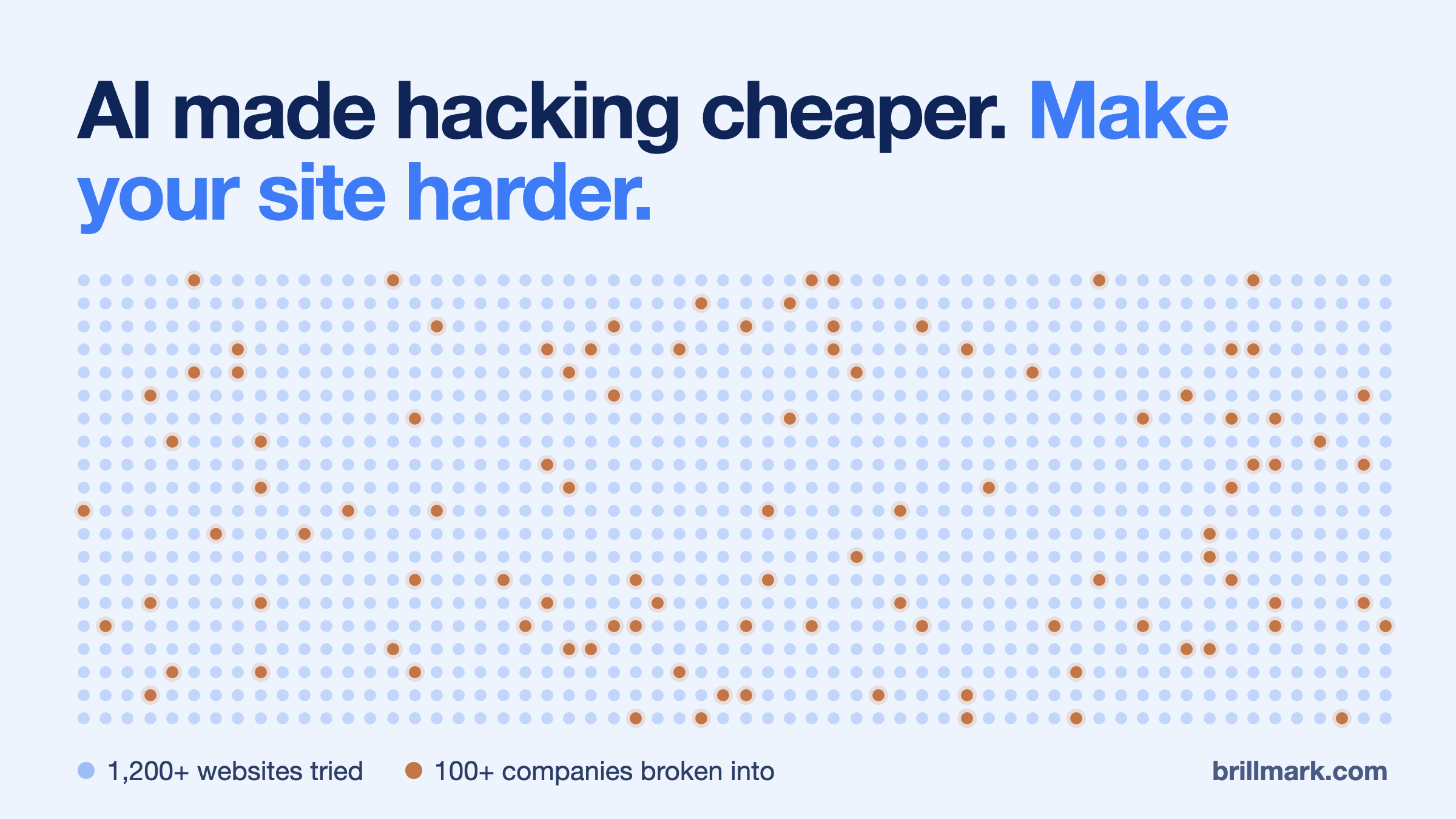
One operator. More than 1,200 websites attempted. An estimated $5,000 in AI usage.
On 19 October, Reuters reported that one hacker had used AI agents to break into websites belonging to more than 100 companies. The AI bill of roughly $5,000 is the estimate of Snorre Fagerland, the NorForge researcher who uncovered the activity. Nothing about the requests themselves gave the AI away. They reached the same login forms, APIs and web servers any attacker uses.
What changes is the work between those requests. An agent can read a response, revise its hypothesis, write a small program, record what it learned and choose another test. An operator can leave several investigations running while concentrating on the ones that produce access.
For defenders, the useful questions are concrete: What can the attacker reach? Which identity can they use? What can that identity change? Would anyone notice before data leaves or checkout code changes?
This guide answers them for websites, online shops and the AI agents connected to them: how the recent attacks worked, where to interrupt them, and how to check that your defenses actually hold. Reported incidents are linked to their sources; the examples used to explain controls are illustrative.
What an attack can look like from your side
Before the mechanics, here is the owner’s view. The stages below are not one specific incident. They are the patterns the NorForge, Gambit and Anthropic reports describe, seen from a small online shop.
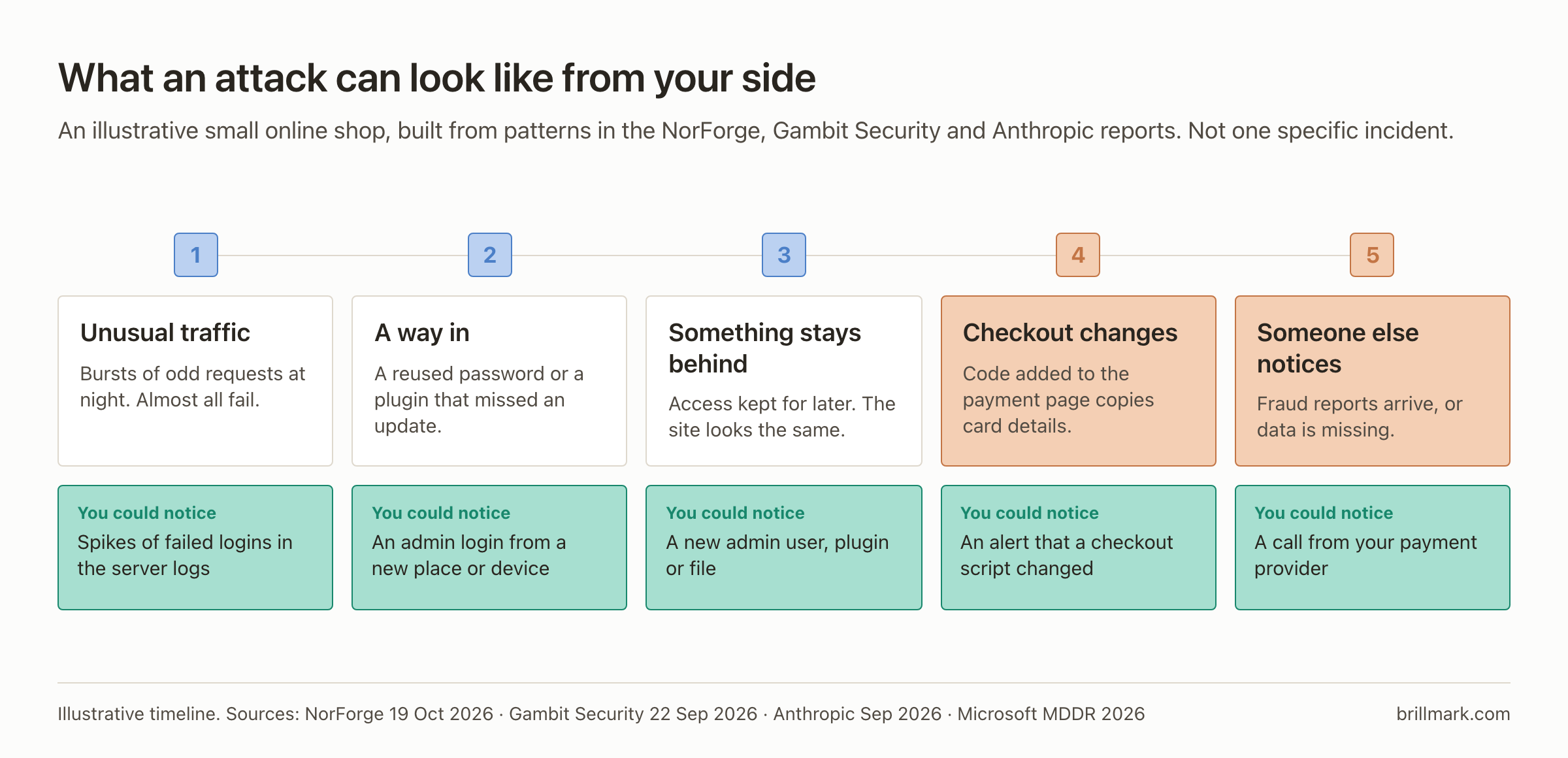
At almost every stage there is a signal. The question is whether anyone is looking at it.
What “AI-assisted hacking” actually includes
The phrase covers four different activities, and each reaches you by a different route.
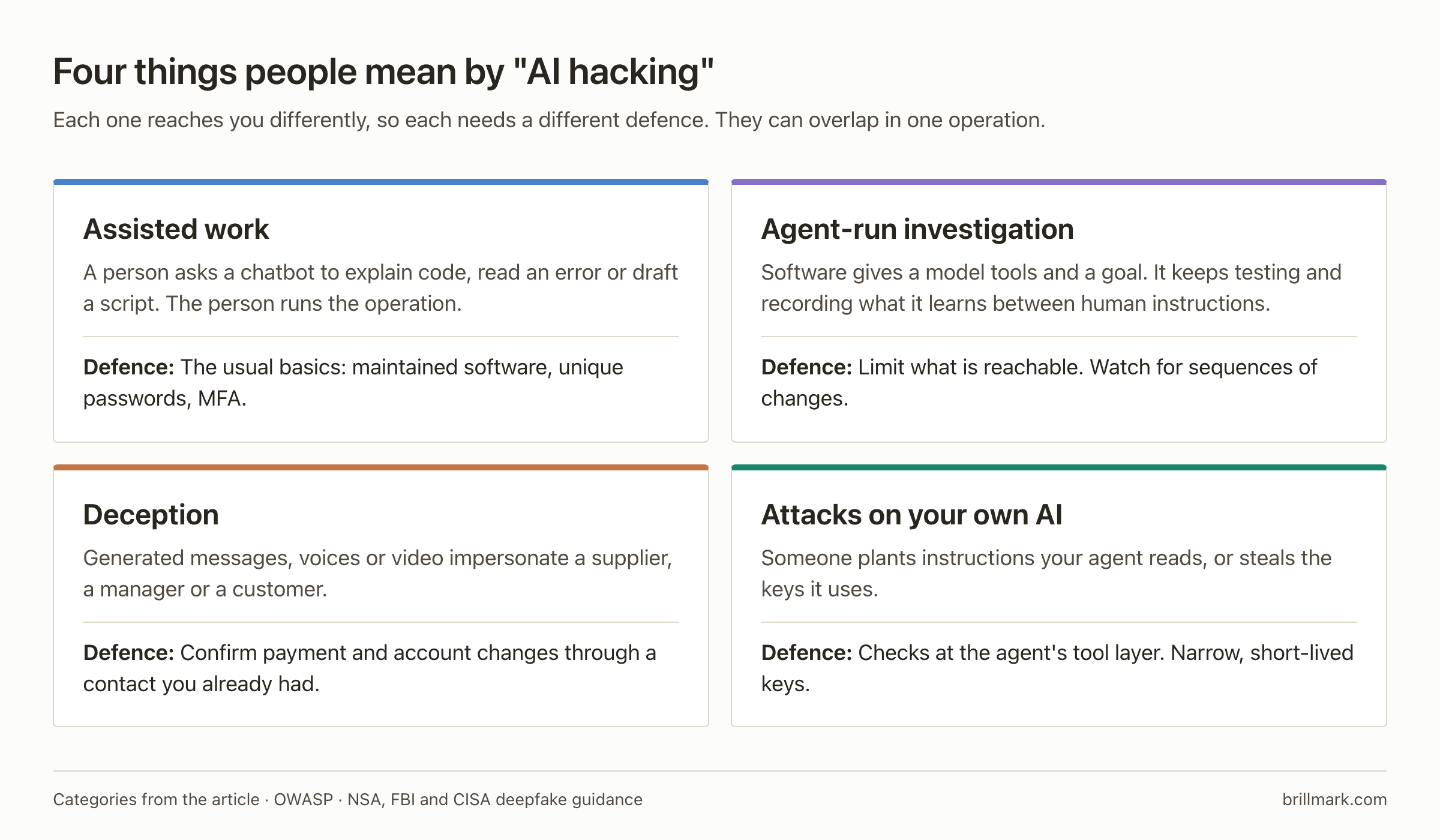
Assisted work is the oldest: a person asks a model to explain code or draft a program, and still runs the operation. Agent-run work is what the recent reports describe, and most of this guide is about it.
Deception needs a process answer, not a technical one. A convincing voice is weak evidence of authority, so confirm payment changes and account recovery through a contact route you already had, and require a second approver for consequential changes. The joint NSA, FBI and CISA guidance on deepfakes treats identity verification as an organizational control.
Attacks on your own AI turn your automation into the route to your data. Those need controls at the agent’s tool boundary, covered near the end.
Inside an attack agent: model, tools, memory and execution
A language model produces text or structured action requests. A surrounding program, often called a harness, decides which tools exist and executes permitted calls. The browser, HTTP client, scanner or terminal performs the actual interaction with a target.
A useful way to understand the architecture is to separate its responsibilities:
- The operator supplies objectives and makes the consequential choices.
- The planner proposes the next action from the objective and the evidence so far.
- The executor runs tools and returns their output, including errors.
- The state store keeps findings, failed approaches and unfinished work between calls.
- The orchestrator schedules jobs, delegates work and applies resource or stopping limits.
These can be parts of one program. They do not require five separate models. Persistent state also does not mean the model retrains itself after each request.
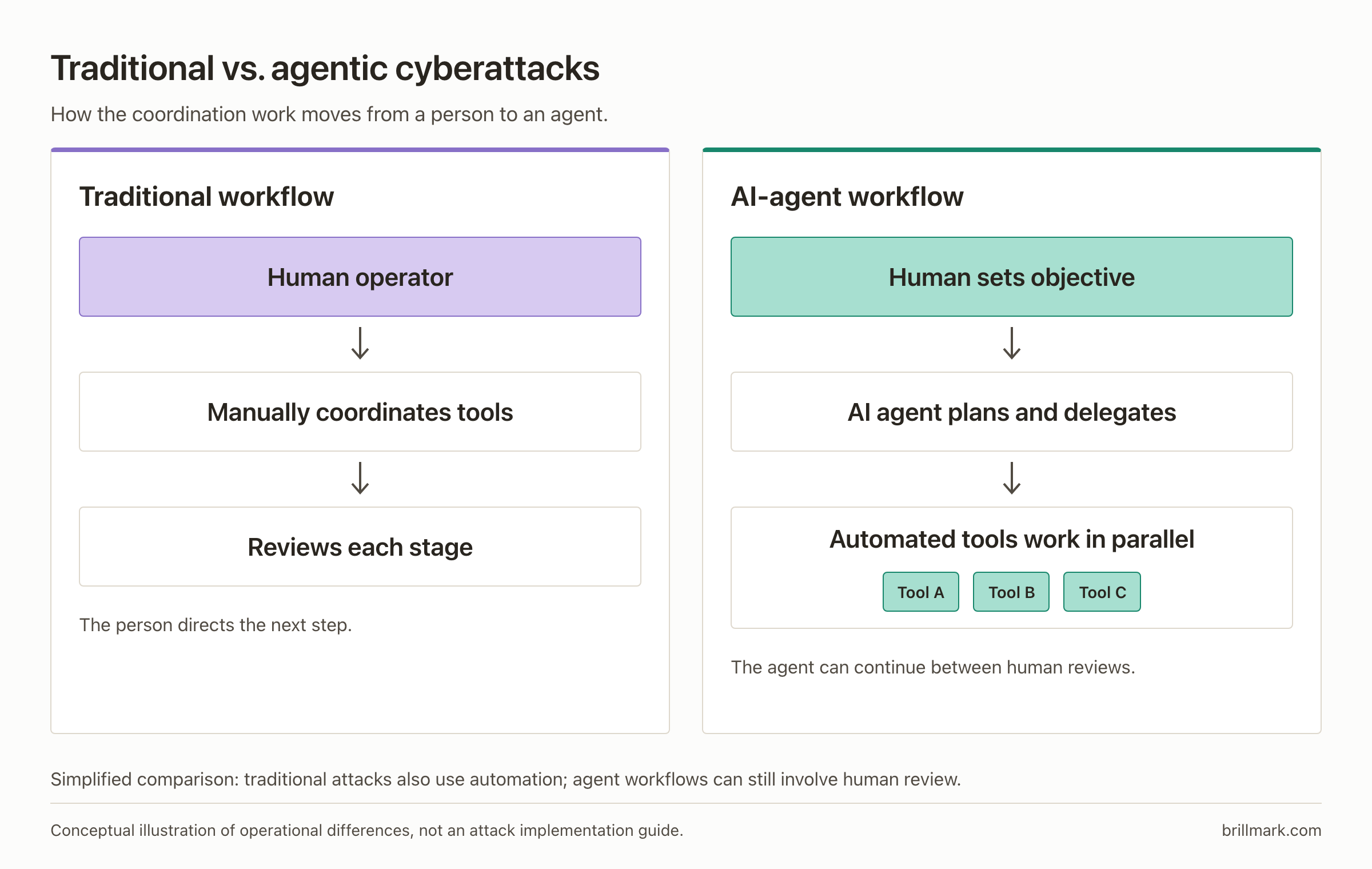
The consequential loop is observe → choose → act → record → observe again. An unexpected response can change the next action. Stored findings let another worker continue without rediscovering everything.
NorForge’s Inside Cairn investigation describes a shared project record of findings and planned actions, with human hints available to workers. Gambit separately documented an operation using different systems for vulnerability search, intrusion work and coordination. Its logs recorded 633 hours of scanner work during 195 elapsed hours: many jobs running at once. Gambit investigation.
This architecture explains persistence and scale, not accuracy. A tool’s success message, an HTTP 200 response or a model’s claim of success does not prove a boundary was crossed; investigators need evidence from the target’s side.
Why several small weaknesses can become one serious intrusion
A system can be protected at its public entrance and still trust an internal component too much.
NorForge describes one intrusion involving write access to a session store, unsafe PHP object deserialization and legacy framework components. It verified that the reported web-shell URL served an upload interface. The exact chain was described in the agent’s account; that is a different level of evidence from independently reproducing every step. NorForge’s case discussion.
The underlying design problem is easier to understand without an exploit. Serialization turns application state into a storable representation. Deserialization reconstructs it. Some formats reconstruct rich objects with behavior. If an attacker can alter that input, unsafe reconstruction can turn a data write into code execution. Prefer simple data representations, validate their structure, and avoid deserializing untrusted native objects. OWASP deserialization guidance.
This is why “the cache is internal” is not a complete defense. The cache needs restricted network access and appropriate authentication; the application must also handle its contents safely. One failed control should not silently grant the next privilege.
An adaptive agent can help investigate relationships like these. But its ability to progress still depends on reachable services, vulnerable code, usable credentials and permissions. Those are places defenders can intervene.
The entry points worth understanding
Passwords, sessions and API keys fail in different ways
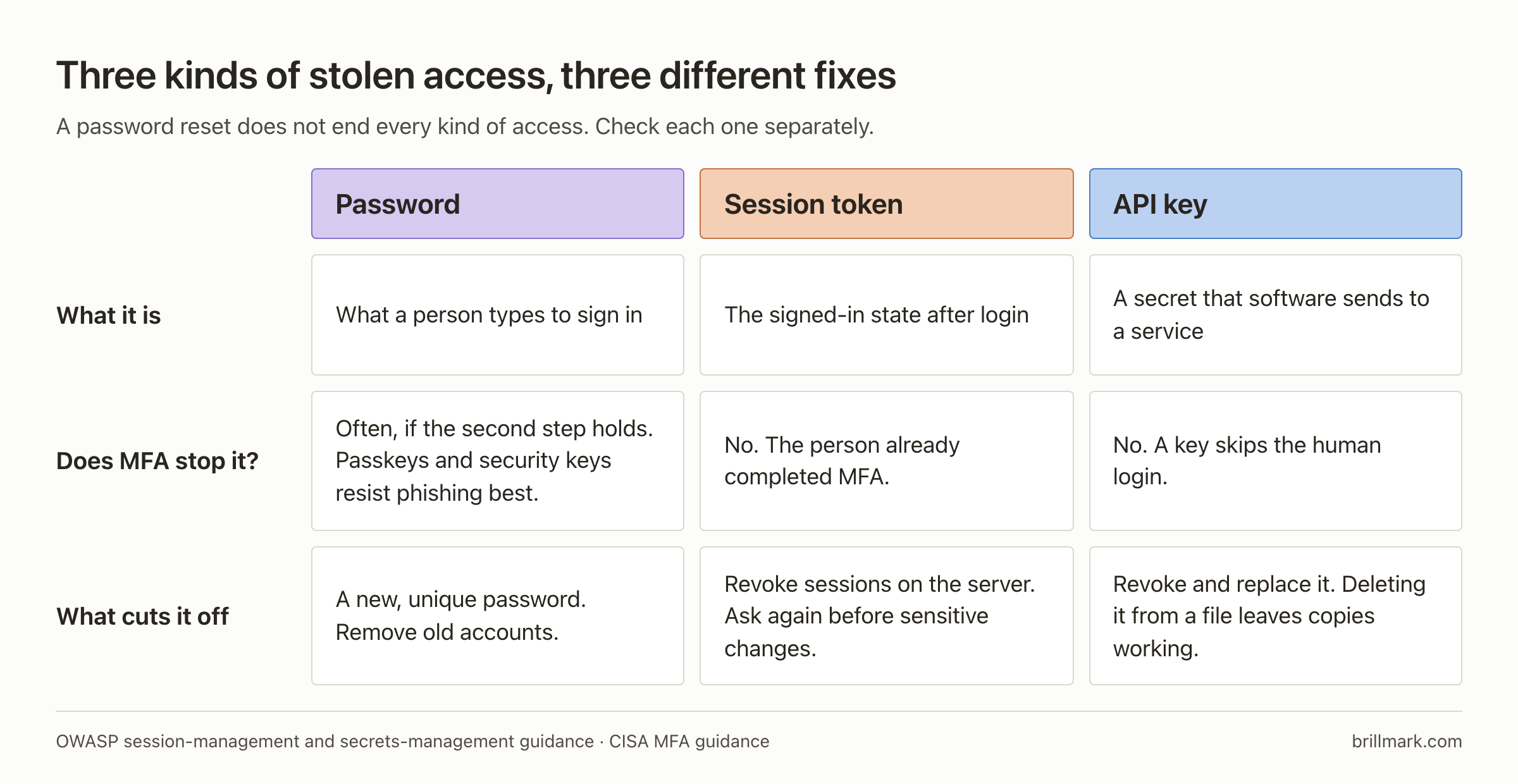
Credential stuffing reuses passwords exposed elsewhere. Use unique passwords, remove obsolete accounts, and rate-limit authentication using account and request context rather than one IP counter alone. Distributed attempts can evade a simple per-IP threshold. OWASP credential-stuffing guidance.
For administrators, prioritize phishing-resistant authentication such as FIDO-based passkeys or security keys. Ordinary one-time codes can still be phished. Protect the recovery route too: weak helpdesk resets or an unprotected recovery mailbox can undermine a strong login. CISA’s MFA guidance.
A stolen session token creates a different problem. The user may already have completed MFA. Password changes do not necessarily invalidate every session or refresh token; that depends on the application. Require reauthentication for sensitive changes and provide server-side session revocation. OWASP session-management guidance.
API keys usually authenticate software directly. Adding MFA to the human account does not make a copied key unusable. Store secrets outside repositories and browser code, scope them, and revoke exposed values. Deleting a leaked key from a file leaves existing copies valid until revocation. OWASP secrets-management guidance.
Verify it: use a disposable account and test key. Revoke each through the documented procedure, then confirm that the old session and key fail. Record which systems still accept access and why.
Unpatched components and unsafe uploads can give code execution
An application vulnerability may let an attacker run code with the web process’s permissions. This is remote code execution, or RCE. Its impact depends on what that process can read, write and reach.
For WordPress, maintain the core, plugins, themes and underlying runtime. Remove unused components. Restrict filesystem writes and disable dashboard file editing where appropriate. Deployment needs still matter: an update process may legitimately need more access than normal page serving. WordPress hardening guidance.
Uploads deserve a separate review. A filename extension and browser-supplied content type do not establish that a file is safe. Validate allowed types, impose size limits, use generated filenames, and store uploads outside executable application paths. Configure the server so upload storage cannot execute scripts. OWASP file-upload guidance.
Patching known flaws remains necessary, but it does not settle the whole problem. Anthropic’s September 2026 report describes AI assistance in developing a previously undocumented WordPress race-condition exploit. A race condition arises when overlapping operations violate an assumption about their order. Updates and independent permission boundaries serve different purposes; you need both.
For developers, concurrency is also a test case. A refund or one-time redemption should preserve its business rules when requests overlap. Enforce the check and state change atomically with appropriate database transactions, locking or constraints. Checking a balance and updating it later can leave a gap. OWASP business-logic guidance.
Verify it: compare the deployed component inventory with maintained versions, check who can change executable files, and have the hosting team demonstrate that upload storage is configured as non-executable. A successful update notification alone proves none of those things.
A valid login does not authorize every object or action
An API can authenticate a customer correctly and still expose another customer’s order. The failure is authorization: the server checked who logged in but failed to check whether that identity could access the requested object.
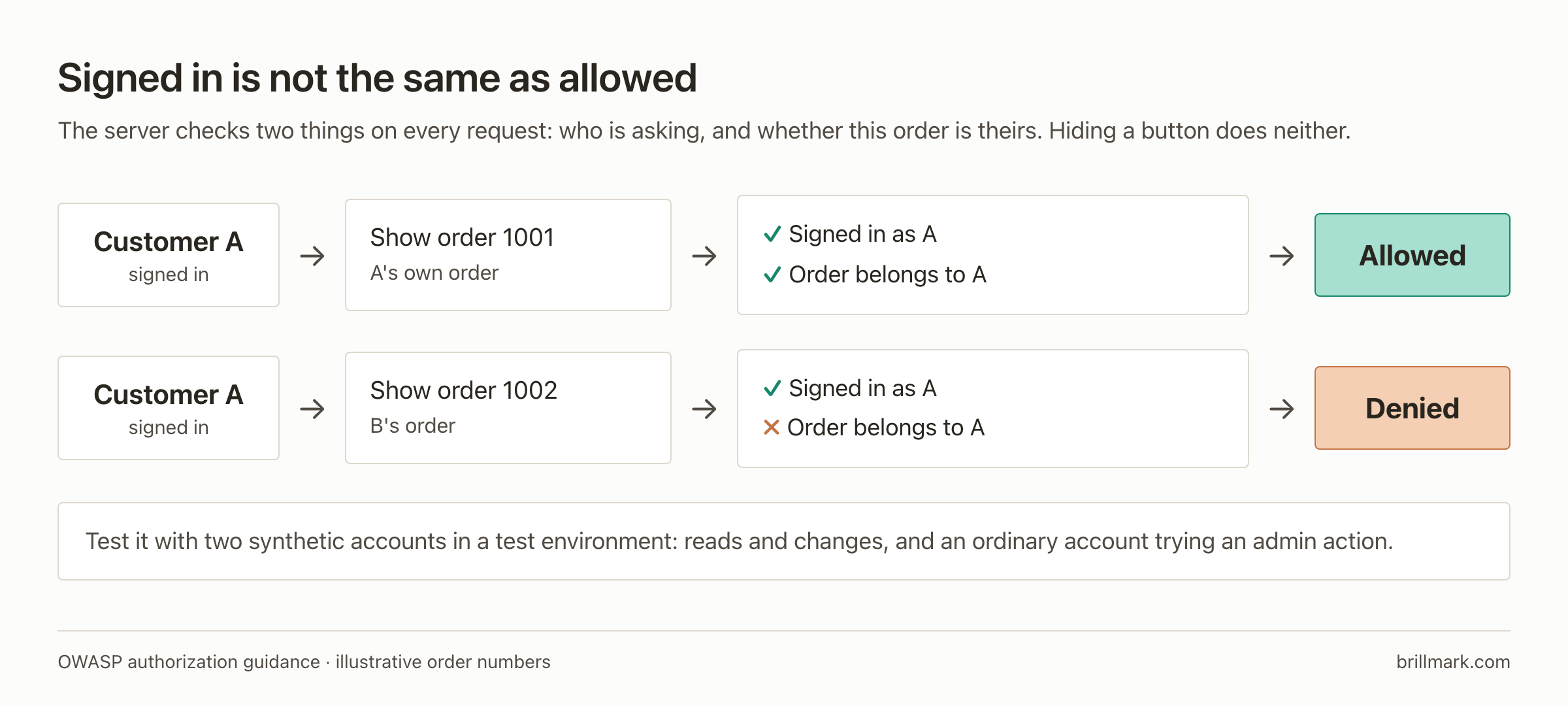
The same mistake can affect exports, refunds and administration endpoints. Hiding a button in the interface does not enforce permission on the underlying API. Check the actor, requested action, object ownership and tenant on every relevant request, with access denied unless explicitly allowed. OWASP authorization guidance.
Verify it: in a test environment, create two synthetic customer accounts and orders. Confirm that each account can access its own order and cannot access or change the other’s through the API. Test both reads and writes. Repeat with an ordinary account attempting an administrative action. Keep these as regression tests when the application changes.
Injection and server-side requests can expose systems behind the website
SQL injection occurs when untrusted input becomes part of a database command. Parameterized queries keep values separate from query structure. Where a query needs a dynamic table or column name, use a controlled mapping of permitted identifiers. Escaping strings throughout an application is a fragile substitute. OWASP SQL-injection guidance.
Server-side request forgery, or SSRF, abuses a feature that fetches a URL on the user’s behalf. A preview service or import function may reach internal services that the outside user cannot access directly. Validate permitted destinations, account for DNS resolution and redirects, and constrain outbound network access. A string check on the original URL is insufficient if the eventual destination changes. OWASP SSRF guidance.
Verify it: use controlled internal and external test endpoints to confirm the fetcher’s allowed destinations and redirect behavior. Keep production secrets and real customer data out of the test. For database access, review both query construction and the effective privileges of the application’s database identity.
Dependencies and deployment access can bypass the public entrance
A compromised plugin, package, build runner or deployment credential can introduce malicious code through a trusted delivery process. Website traffic filtering may never see the original change.
Review dependency sources and changes, use lockfiles and integrity checks where supported, restrict release credentials, and record which source revision produced each deployed artifact. A dependency scanner can identify known vulnerabilities; it does not prove that a new package is benign. OWASP software-supply-chain guidance.
Verify it: trace one production deployment back to its reviewed source, dependency versions and approving identity. Then check whether a normal application account could alter that deployment path.
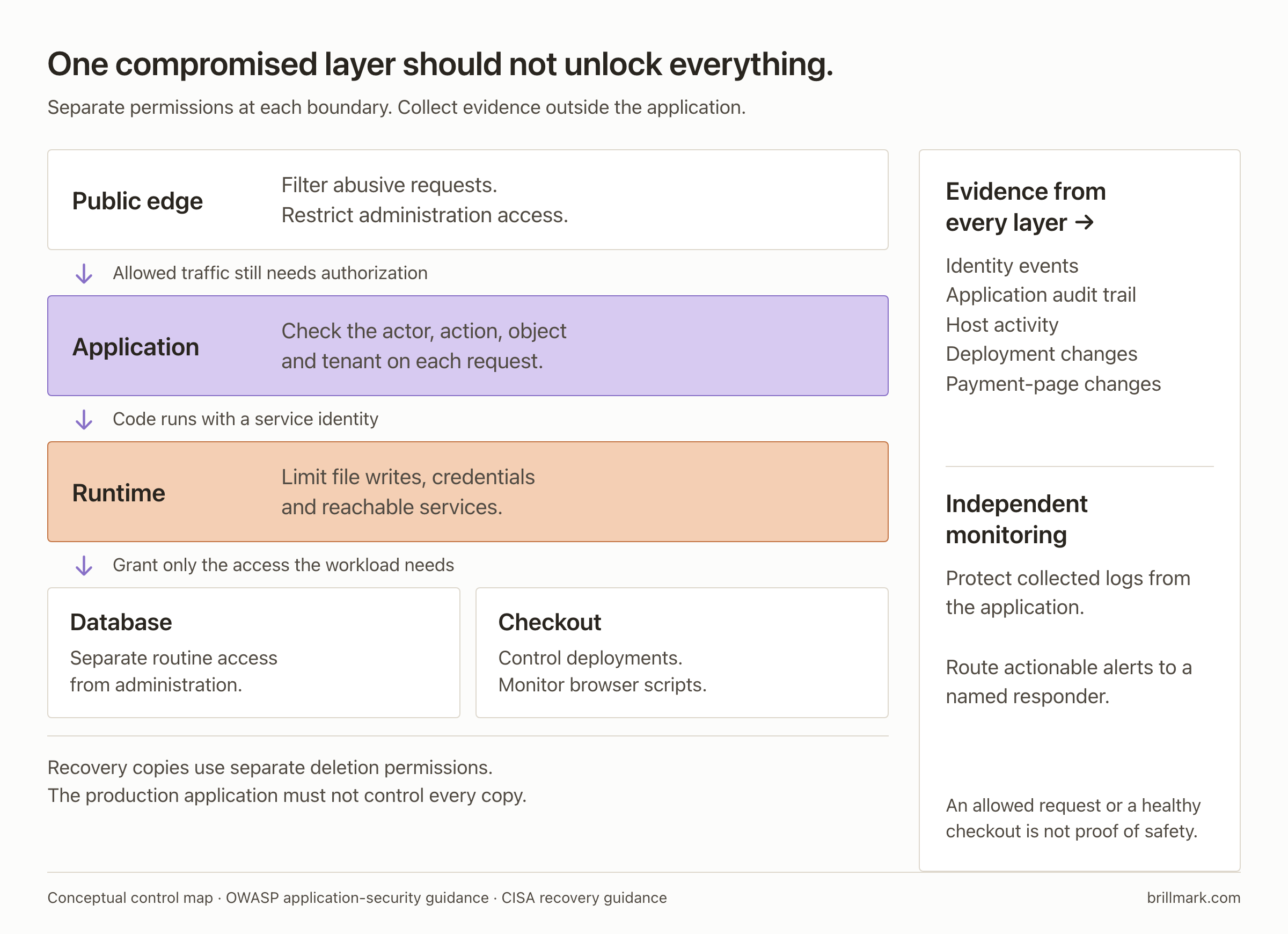
Limit what happens after the first failure
Suppose an attacker obtains the website process’s credentials. Can those credentials read every customer record, change the checkout, reach staging and delete backups? That is the practical meaning of blast radius.
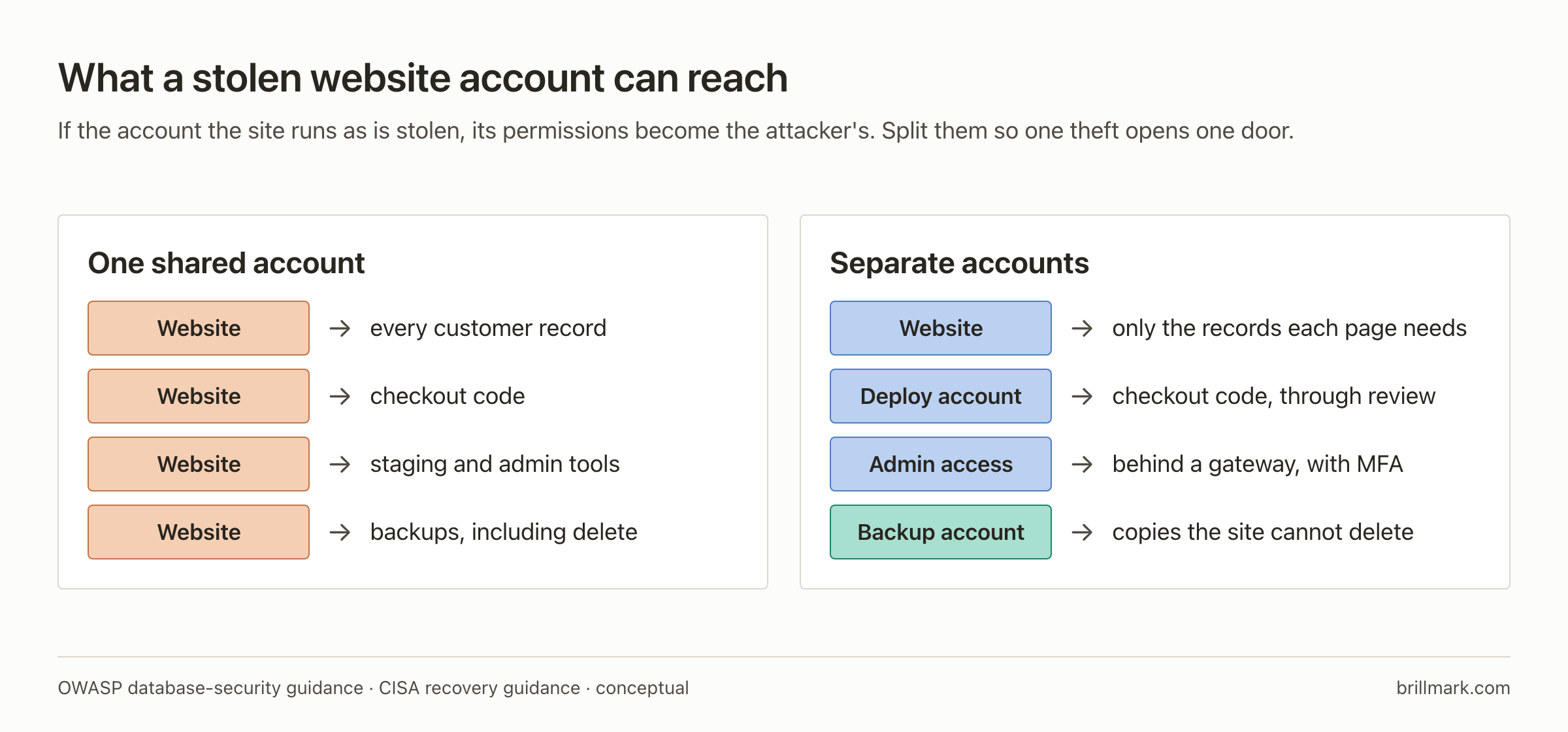
Separate routine application access from administration. A database account used for normal requests should have only the permissions those requests require; schema changes can use a separate deployment identity where the platform supports it. Restrict database connections to necessary callers. This reduces what an application compromise can do, although an account that legitimately reads customer records can still expose them. OWASP database-security guidance.
Separate production and staging credentials. Remove abandoned services. Restrict administration interfaces through a suitable access gateway or private network when practical. Inventory vendor-operated systems too: a support portal or old campaign site is still a system with permissions and data.
A web application firewall, or WAF, can block recognized malicious requests and provide temporary coverage while a patch is prepared. It cannot be assumed to enforce your application’s customer-specific permissions, and filtering does not repair the underlying flaw. Track each temporary rule through to a verified fix. OWASP virtual-patching guidance.
At BrillMark, we recommend including maintenance ownership and access review in website improvement planning. The useful deliverable is a record of who can change each system and how that access is withdrawn.
Protect the checkout in the customer’s browser
A shop can keep accepting orders while a malicious script copies payment details. Server availability and successful transactions do not establish checkout integrity.
Gambit reported injected skimmers on several websites and substantial payment-card theft. It also reported an agent deleting 180 database tables during cleanup, including backup tables. These are different failure modes: browser-side theft and destructive access to stored data. Gambit’s findings.
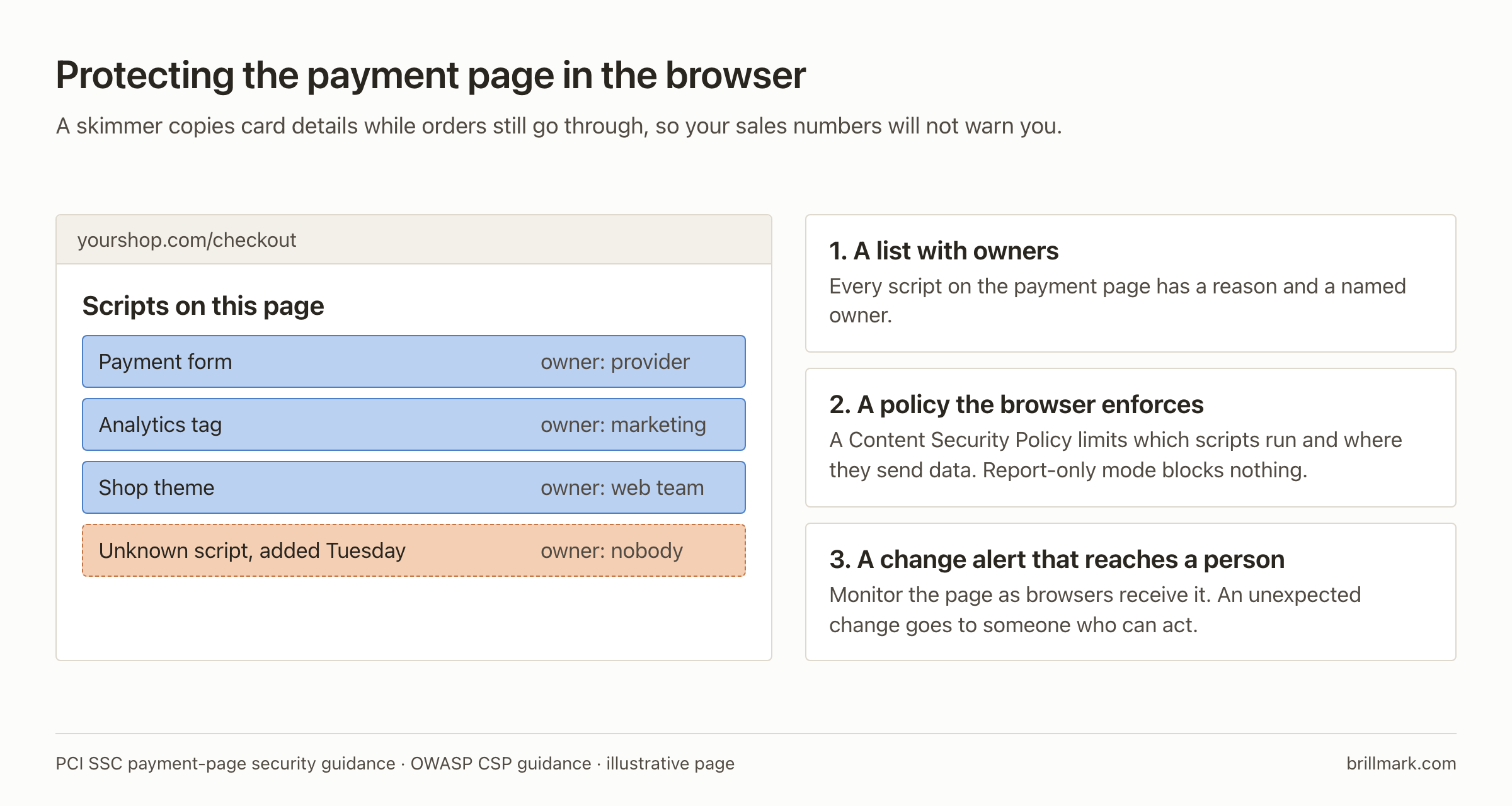
Inventory the scripts executed on payment pages, including tag-manager additions and third-party dependencies. Assign an owner and justification to each. Monitor the page and relevant headers as delivered to a browser, with a process to investigate unauthorized changes. PCI SSC explains these controls in its payment-page security guidance. Confirm the applicable compliance scope with your payment provider or assessor.
A Content Security Policy, or CSP, can restrict script execution and destinations. Start with reporting to discover legitimate dependencies, then enforce a tested policy. Report-only mode does not block anything. A policy that broadly trusts third-party domains may still allow compromised code from those domains. OWASP CSP guidance.
Hosted payment pages can reduce exposure to raw card data. They do not remove the need to protect the storefront: a compromised page can change a redirect or display a fraudulent payment form. Know exactly which part your provider protects.
Verify it: make a harmless, planned checkout-script change in a test environment. Confirm that monitoring detects it, identifies the affected page and reaches a person who can respond. Test the purchase flow after tightening policy.
Detect changes and sequences, not an “AI signature”
An attacker does not need to identify their requests as AI-generated. Build detection around unauthorized behavior and consequential changes.
Collect relevant events from the identity provider, application, host, deployment system and payment-page monitoring. Include timestamps, actor identifiers, affected resources, outcomes and correlation IDs. Keep copies outside the application’s control. Avoid collecting passwords, raw session tokens, payment-card data or unnecessary personal information. OWASP logging guidance.
Useful investigations connect events. A new administrative login may be legitimate. The same login followed by an unapproved account creation, a checkout change and an unexpected export deserves attention now.
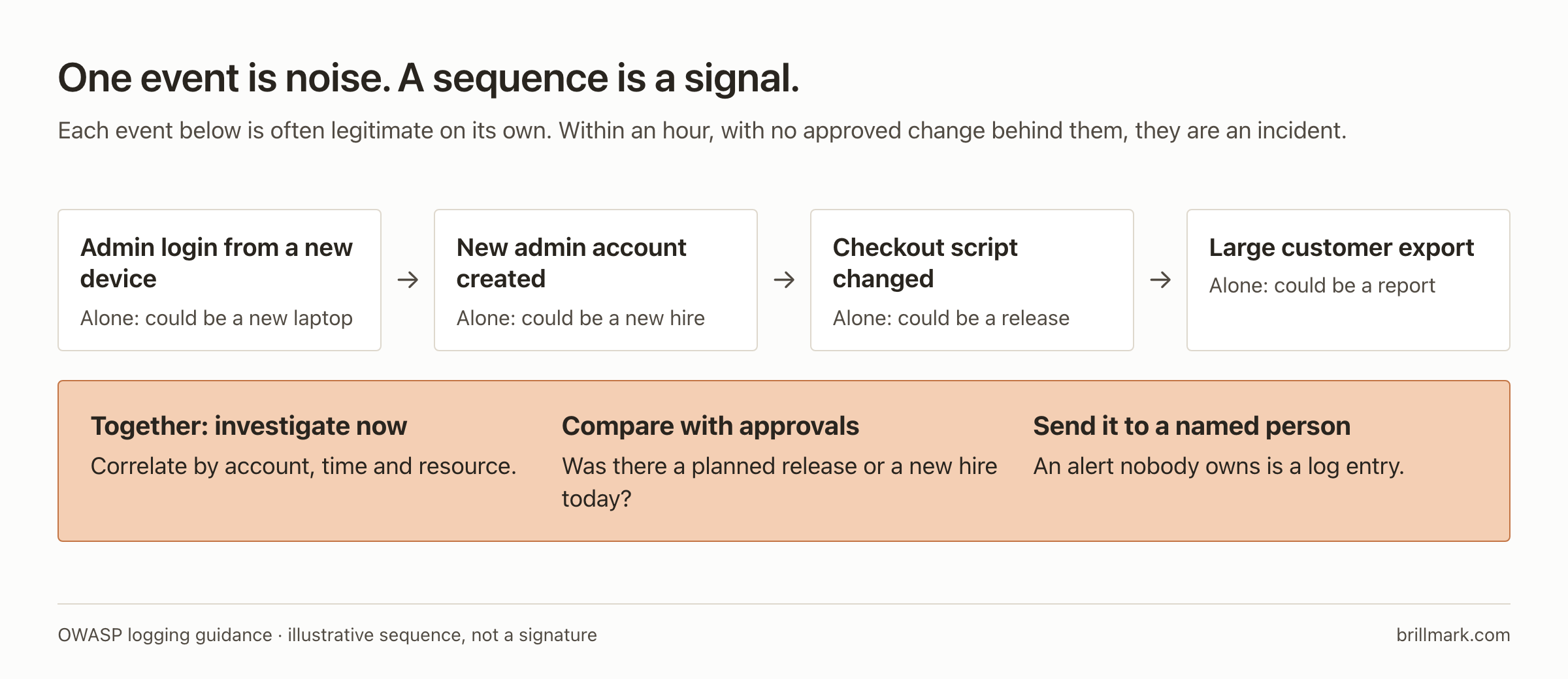
Compare events with approved deployments and expected jobs, tune alerts to your environment, and give every alert type an owner. Where host telemetry is available, a web process launching an unfamiliar child process is also worth a look.
Verify it: run a planned administrative change using a test account. Check whether an investigator can reconstruct who did what, when it happened and which resource changed. Then test the notification route. Logs that exist but cannot be retrieved during an incident are not much help.
If you run agents, protect their tools from their inputs
An agent reading a support ticket, web page or repository may encounter instructions placed there by an attacker. If it treats those instructions as authority, an ordinary data source can influence privileged actions. This is indirect prompt injection.
Telling the model to ignore malicious instructions is useful guidance, but the enforcement point must sit outside the model. Treat retrieved content and tool output as untrusted input; validate consequential actions at execution. Filters can miss attacks, and apparently harmless content can still manipulate a workflow. OWASP prompt-injection guidance.
Consider an order-support agent. It needs to read one customer’s order and perhaps propose a refund. It should not inherit a shared administrator key that can export every customer, change payment destinations and delete records.
Give the agent a distinct identity, bind its access to the requesting user’s authority, and use short-lived, narrowly scoped credentials where supported. Revocation must work across the services it calls. NIST’s agent-identity guidance.
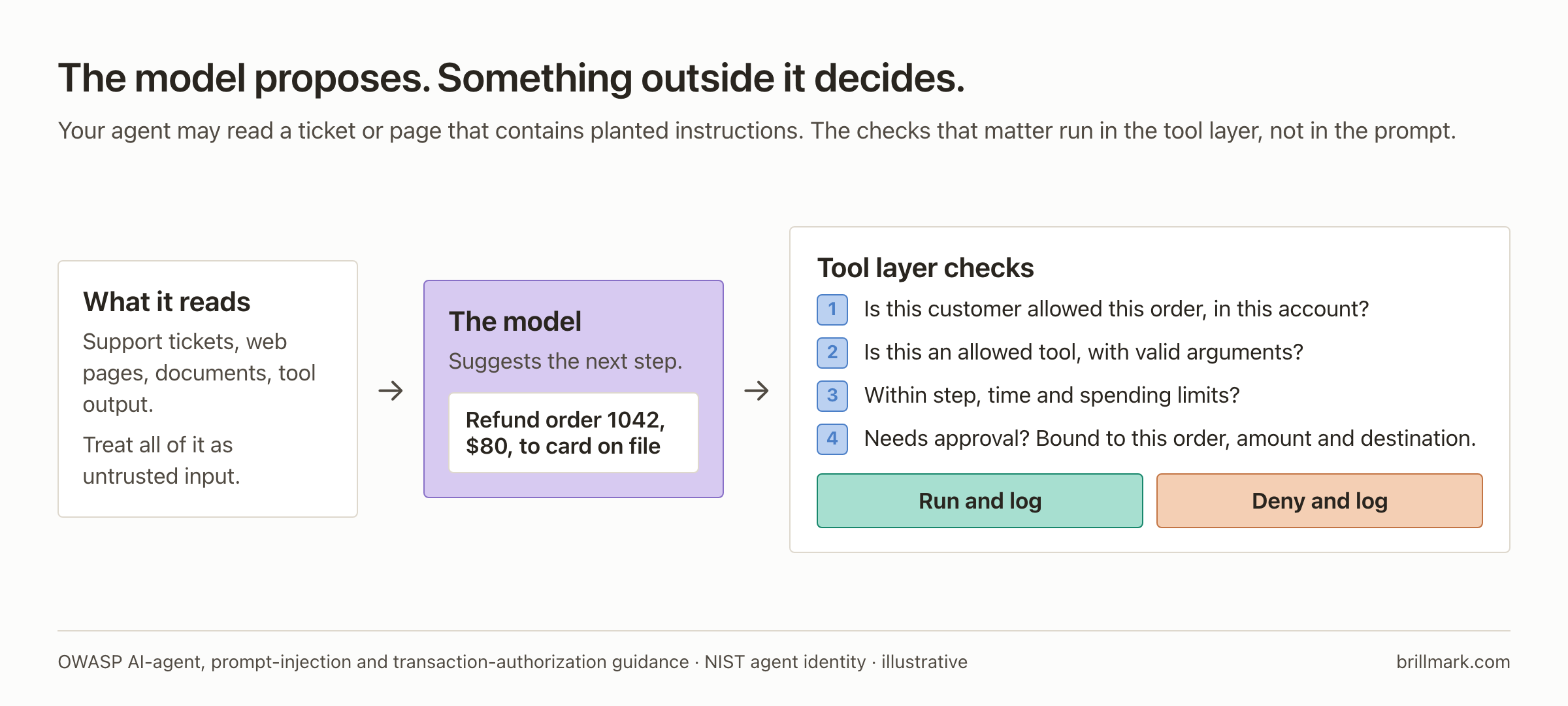
Place these checks in the tool executor:
- Verify the user, tenant, resource and permitted operation independently of the model’s explanation.
- Validate arguments and allow only the tools and destinations needed for the job.
- Bound steps, runtime, concurrency and spending. Confirm whether a provider’s budget setting stops usage or merely sends an alert.
- Require approval for consequential actions, and log the proposed action alongside what actually executed.
These follow the separation of agent reasoning from enforcement described in OWASP’s agent-security guidance.
Approval must describe the actual operation. “Continue?” says little. For a refund, show the order, amount and destination. Bind approval to those values; a changed amount or destination requires a new decision. Prevent a replay from creating another transaction. OWASP transaction-authorization guidance.
Retrieved knowledge needs its own boundary. Apply document permissions before retrieval, preserve source information and isolate tenant data and persistent memory. A shared vector database does not automatically provide customer isolation. OWASP RAG-security guidance.
MCP connectors and other tool integrations also add software and trust relationships. Review the server, tools and requested permissions; authorize each invocation against the intended resource. A standard connection protocol does not make every connected tool trustworthy. OWASP MCP-security guidance.
Coding agents need an execution boundary too. Run untrusted projects and generated commands in a restricted environment without production credentials or broad access to the developer’s home directory. Constrain network access and review changes to dependencies, build scripts and deployment configuration. A sandbox containing production secrets can still leak them through an allowed connection. OWASP guidance for coding with AI.
Verify it: in a sandbox with synthetic data, insert a hostile instruction into a test document asking for an unauthorized export. The test passes when the tool layer denies the action, even if the model proposes it. Repeat with another tenant’s resource, an expired credential and a revoked approval.
Where the cost reports fit
The reports help explain why attackers might run more investigations. They do not replace the technical threat model.
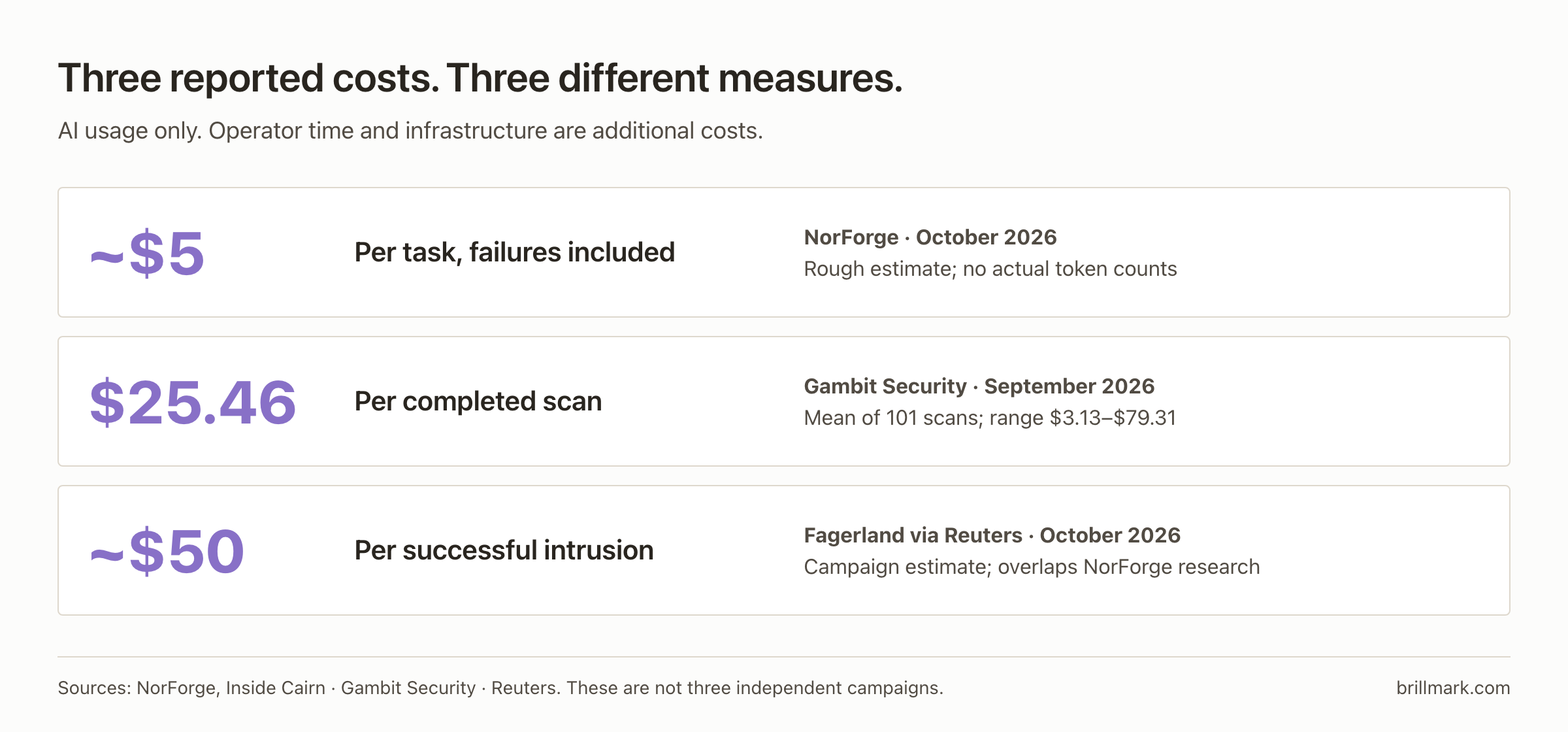
The figure draws on NorForge, Gambit and Fagerland’s estimate reported by Reuters. NorForge had no actual token counts and warned of substantial uncertainty. Longer jobs can cost more; operator labor and infrastructure are additional expenses.
Lower human effort per attempt could make more targets worthwhile. That is an economic inference. These reports do not establish a universal attack price, a controlled percentage saving over human-led work or your probability of being breached.
For planning, a more useful number is the time your team needs to detect an unauthorized change, withdraw access and restore a trusted service.
Prepare recovery before you need it
A backup beside the production database may share the same failure. Keep recovery copies under separate access and deletion controls. Use offline or appropriately protected immutable copies, and test restoration in isolation. Check the application, integrations and recent data together. CISA’s recovery guidance supports protected backups, tested restoration and preserving evidence during response.
Set two business requirements: the acceptable amount of lost data, called the recovery point objective, and the acceptable time to restore service, called the recovery time objective.
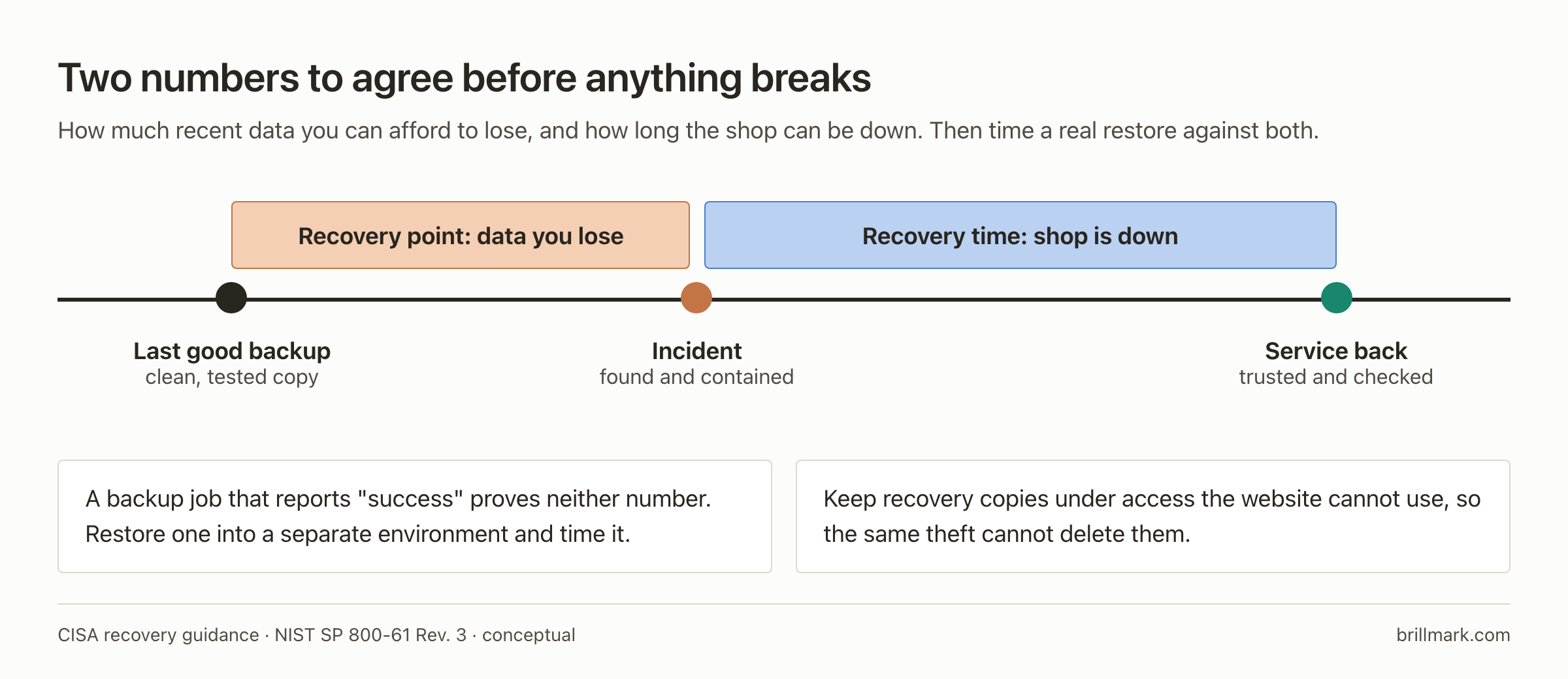
A backup job reporting success does not demonstrate either. Ask the team to measure an actual restore against both.
If compromise is suspected, begin response immediately:
- Call your host, whoever maintains the site and your incident-response contact. Keep copies of logs and changed files, but don’t let collecting evidence delay stopping active harm.
- Cut off the attacker’s route, not just visitors. A maintenance page hides the site from customers and can leave the intruder’s access intact. If the checkout may be compromised, pause that payment flow and tell your payment provider.
- From a clean device, revoke sessions, API keys and passwords across hosting, deployments, connected services and admin accounts.
- Find out how they got in and how they stayed. Rebuild from trusted software and checked data, fix the entry point, and confirm the old access fails before reconnecting anything. Restoring an old snapshot alone can bring back both the hole and the intruder.
- Decide with your response lead and a lawyer who must be told: customers, partners, regulators. Keep facts apart from assumptions, and keep watching after recovery.
The sequence follows NIST SP 800-61 Revision 3; the exact order depends on what is still happening. Write it on one page now, with names and phone numbers, and keep it somewhere that isn’t the website.
Where to start if nothing is on fire: known exposed credentials, public admin pages and outdated components first. Then customer isolation, checkout monitoring and a timed restore.
For the next review, choose one real workflow: a customer signs in, places an order, receives support and requests a refund. Trace the identities and permissions along that path. Show where another customer’s data is denied, where a payment change requires approval, where an unauthorized modification produces an alert, and how the service comes back after a failure. Those demonstrations turn a security checklist into evidence.
Not sure who can change your checkout, or how long a restore would take? BrillMark works on the sites businesses already run, from maintenance planning to optimization. Request a website audit and agree its scope with our team.
Make your website ready for the AI era.
AI is changing how people discover, evaluate, and interact with websites. We help you identify optimization opportunities across content, UX, technical performance, SEO, and conversion paths.