On 16 November 2026, malicious JavaScript ran on the websites of 178 organisations, including the BBC, CNN and Zoom. It did not break in through their servers. It arrived inside the A/B testing snippet those sites already trusted.
A/B testing security is the set of controls that keep that from happening to you: who can change experiment code, who checks it, how fast you can pull it, and what the browser is allowed to do with it. You don’t need to stop testing. You need to treat test code like the production code it is.
What is A/B testing security?
A/B testing security means protecting the JavaScript your experimentation platform runs on your site, so that only reviewed, approved code reaches visitors. Most client-side testing tools (Optimizely Web, VWO, Convert, AB Tasty and others) work by loading one script that can rewrite any page it runs on. Whoever controls that script controls what your visitors see and what their browsers send.
If a script can change your checkout, it deserves the same care as your checkout.
What happened in the Optimizely security incident?
An attacker added malicious JavaScript to customer projects in Optimizely Web Experimentation, and Optimizely’s own CDN served it to visitors. Optimizely’s incident report says an unauthorised party “exploited a vulnerability in Experimentation” to do it. The company told BleepingComputer the flaw was in the account signup flow, and that it has since been fixed.
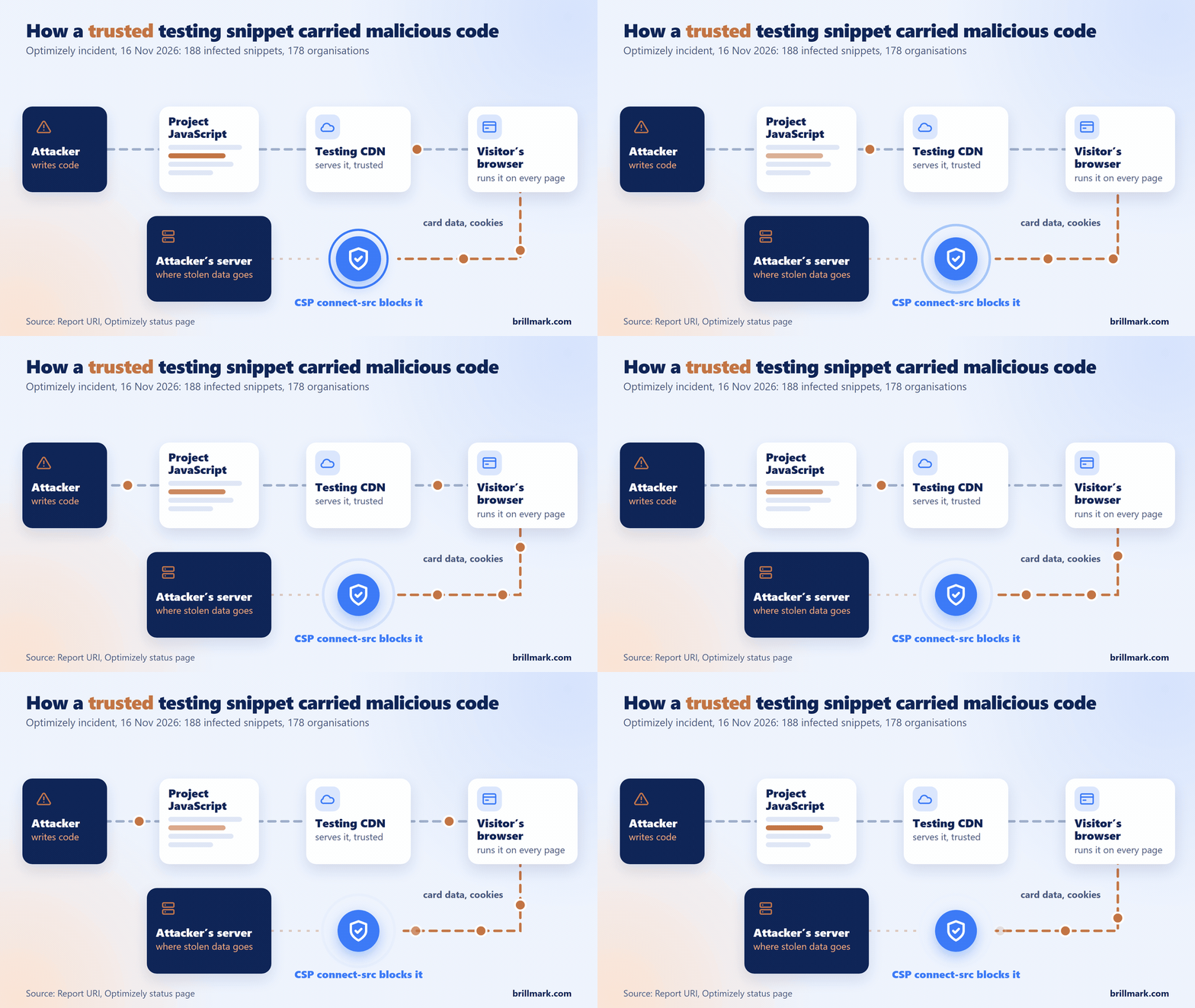
Security researcher Scott Helme at Report URI checked 1,611 Optimizely snippets that day and found malware in 188 of them, belonging to 178 organisations. He expects the real number is higher. The code sat in Project JavaScript, the project-wide code field that runs on every page loading the snippet. It swapped cryptocurrency wallet addresses, skimmed card numbers typed into on-page forms, sent cookies and screenshots to an outside server, and loaded iOS exploit kits on iPhones.
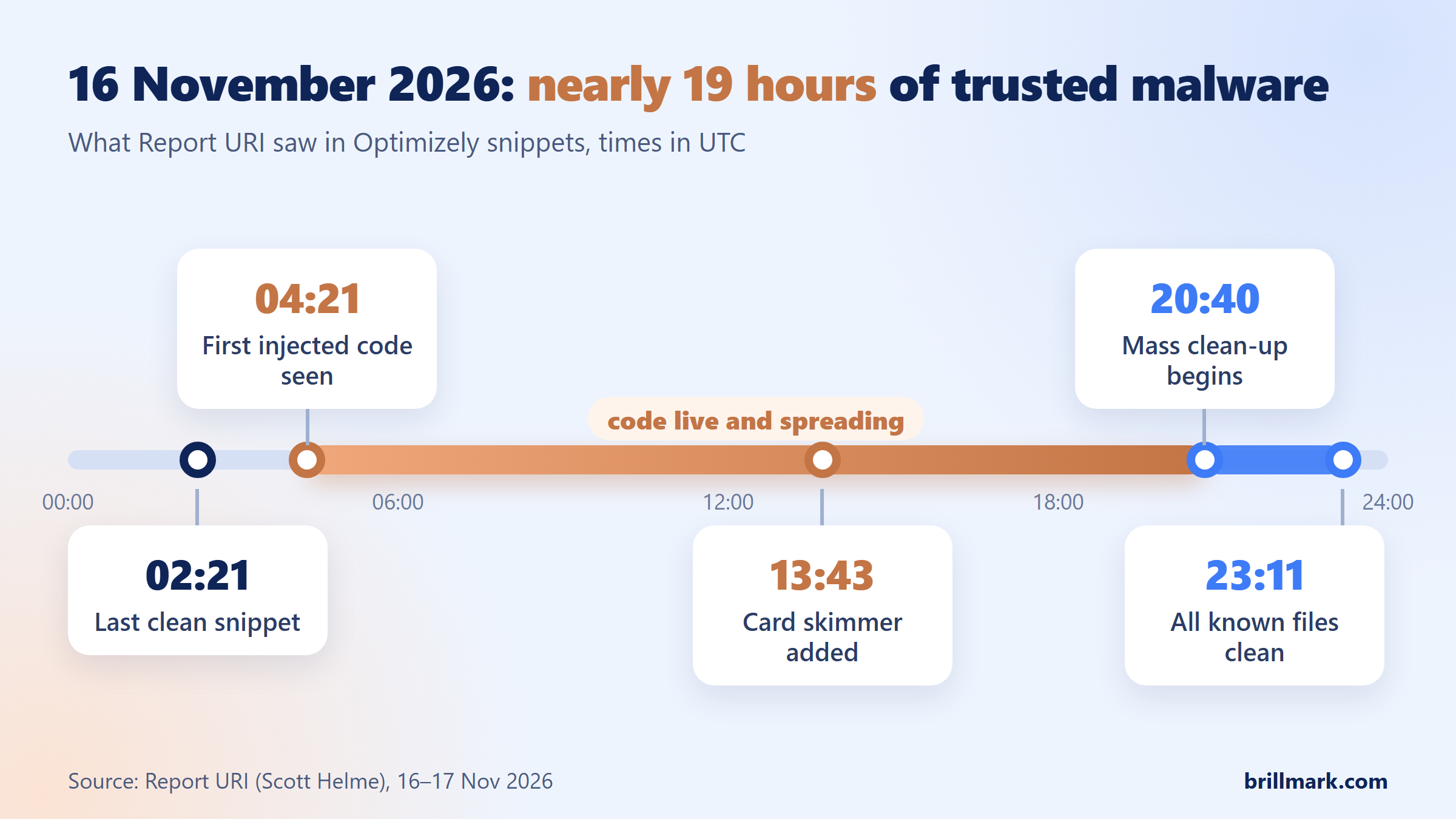
The code ran for most of a day because nothing on the affected sites treated a trusted snippet as something that could turn hostile.
Why can client-side A/B testing create security risks?
Client-side testing tools exist to change your pages without a deploy. The snippet edits content and layout, swaps buttons and forms, tracks clicks, and runs custom JavaScript written for each variation. Every one of those powers is useful for a test and dangerous in the wrong hands.
Malicious code in that snippet can:
- change content to mislead visitors, or redirect them to a fake site
- read what people type into forms, including card fields drawn on your page
- read cookies that aren’t marked HttpOnly (a flag that hides a cookie from page scripts)
- send what it collects to a server you have never heard of
How much damage it can do depends on your site. In this incident, card fields inside a payment provider’s hosted iframe were out of reach. Fields drawn directly on the page were not.
7 security practices every A/B testing team should follow
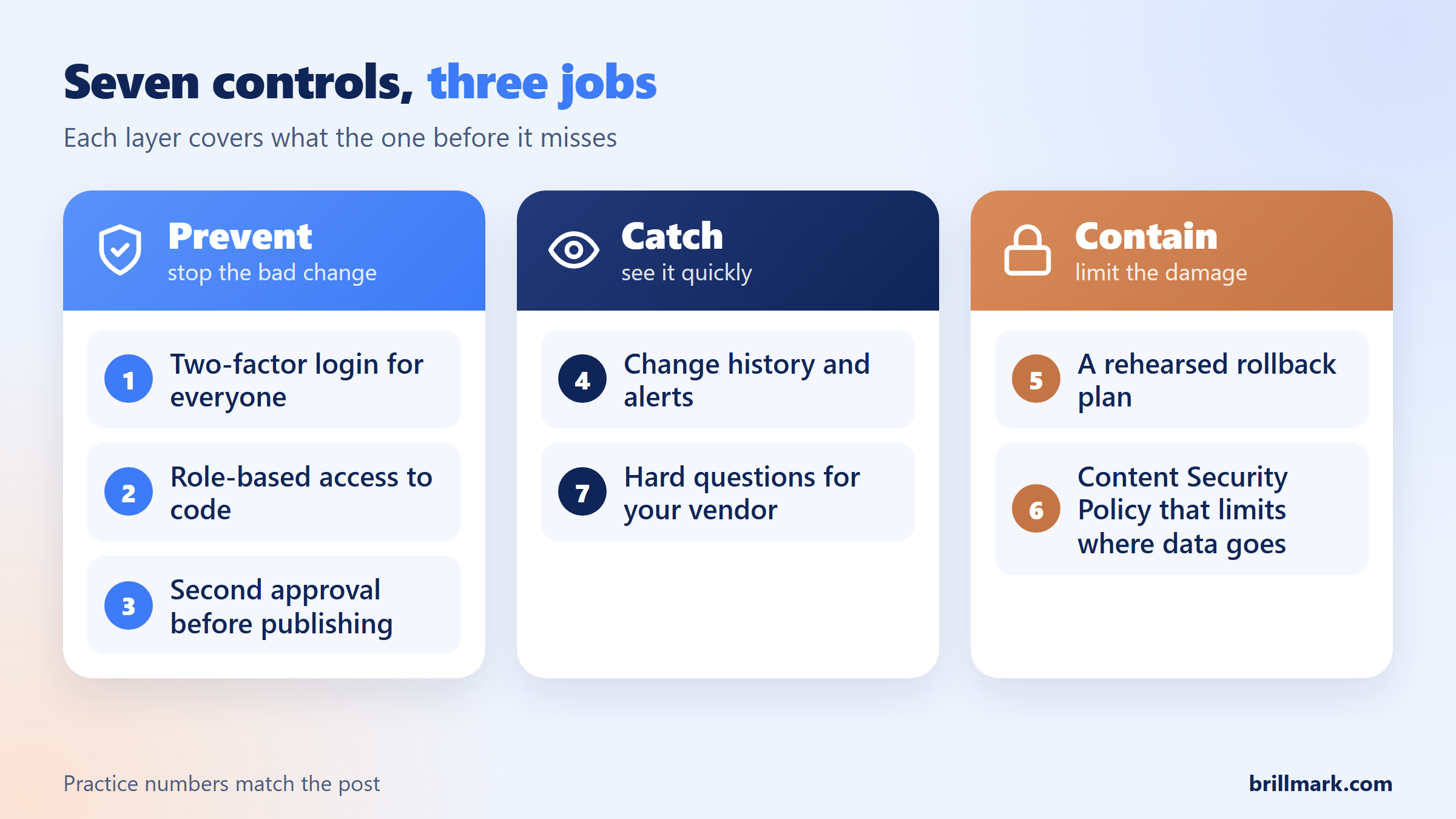
The seven controls fall into three jobs: stop the bad change, catch it quickly, and limit what it can do once it is live.
1. Turn on two-factor authentication (2FA)
2FA asks for a second proof, such as a phone prompt, after the password. Require it for every account on the testing platform, ban shared logins, and use single sign-on (SSO, one company login for every tool) where your plan offers it. 2FA protects your accounts, not the platform: it would not have stopped a flaw like the one exploited here.
2. Limit who can edit code with role-based access
Role-based access control (RBAC) means each person gets only the permissions their job needs. A marketer reading results doesn’t need to edit JavaScript. A designer may need to configure a test but not publish it. Developers write variation code; one or two people publish.
Remove former employees, contractors and agencies the day the work ends. Lock project-level code, Project JavaScript in Optimizely or its equivalent in other tools, to the smallest group of all, because it runs on every page.
3. Require approval before anything goes live
A second person should approve a test before visitors see it, especially when it adds custom JavaScript, touches checkout, pricing or forms, or calls a third-party service. One compromised account then can’t publish on its own. Check what your approval step actually covers: on many platforms it applies to experiments, not to project-wide code.
4. Watch the change history
You should be able to answer, for any change: who made it, what changed, when, and who approved it. Review the log for project-level code changes you didn’t plan. If your platform can send change events to a central monitoring or alerting system, turn that on. In this incident, injected code was first seen at 04:21 UTC and the mass clean-up began at 20:40.
5. Practise a fast rollback
When suspicious code appears, the team should already know the steps:
- Pause the affected experiments and remove the unauthorised code, including any in project-level JavaScript.
- End active sessions, revoke API tokens and reset credentials for affected accounts.
- Confirm the cleaned snippet has reached visitors through every cache, and test it from outside your network.
- Rotate any secrets that lived in cookies page scripts could read.
Pausing experiments does not touch Project JavaScript, which runs whether or not a test is live. Ask your vendor how long a corrected snippet takes to replace the old one in caches; no vendor publishes one standard figure.
6. Set a restrictive Content Security Policy (CSP)
A Content Security Policy is a header that tells the browser which sources your page may load scripts from and which servers it may send data to. Two directives matter most here: script-src, which lists allowed script sources, and connect-src, which lists where fetch, XMLHttpRequest, WebSocket and sendBeacon requests may go.
Report URI checked the affected organisations’ sites. The results show what CSP can and can’t do:
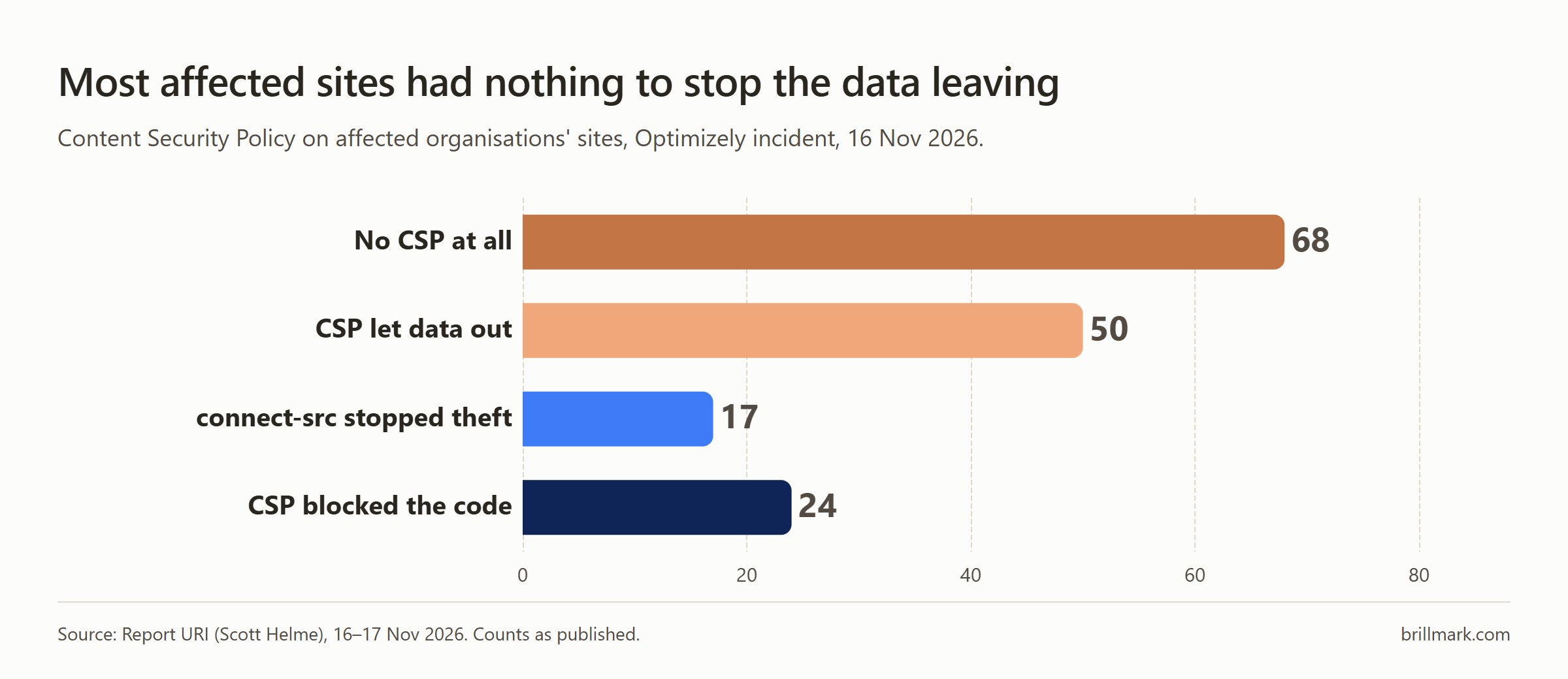
Allowing the testing CDN in script-src does nothing here, because the malicious code came from that CDN. A tight connect-src is what stopped stolen data leaving in 17 cases. CSP limits the damage of a bad script; it does not stop a trusted source from serving one. Test a new policy in report-only mode first so it doesn’t break legitimate tracking.
7. Ask your testing platform hard questions
Before you renew or switch, ask the vendor:
- Is 2FA available, and can we enforce it for everyone?
- Can we restrict who edits project-level code separately from experiments?
- Do approvals cover project-wide code as well as experiments?
- Can change history be exported or streamed to our monitoring?
- How fast does a removed script stop reaching visitors?
- Do you run independent penetration tests, and can we see a SOC 2 report (an independent audit of security controls)?
- How, and how fast, do you tell customers about an incident?
No certification guarantees safety. You are looking for a vendor that answers these clearly and quickly.
A practical A/B testing security checklist
Run this before your next test launches:
- ☐ 2FA is enforced on every testing-platform account
- ☐ Former staff, contractors and agencies have no access
- ☐ Only named developers can edit project-level JavaScript
- ☐ Publishing rights are limited to a few people
- ☐ Custom JavaScript goes through code review
- ☐ Tests touching checkout, pricing or forms need a second approval
- ☐ Someone reads the change log every week
- ☐ A Content Security Policy, with
connect-src, is set and tested - ☐ The team has rehearsed pausing tests and removing project code
- ☐ You have read your platform’s security documentation
Why should security be part of A/B testing QA?
Most A/B test QA checks that the variation looks right, buttons and forms work, goals fire, and nothing breaks across browsers and devices. Those checks don’t ask what the code talks to. For any test with custom JavaScript, add four questions: does it load scripts from domains nobody approved, send data anywhere new, change form or checkout behaviour beyond what the test needs, or use unsafe patterns such as eval or decoding hidden strings with atob? The injected code in this incident hid its server address with exactly that kind of encoding.
That is why our A/B test development work has a person review every line of custom code before a test reaches visitors: a QA pass that only checks how a page looks will pass malicious code that looks fine. Security-minded QA is not a penetration test or an audit. It catches the risky implementation before it ships.
FAQ
Is client-side A/B testing safe?
Yes, with the same controls you put on any production code: limited access, review before publishing, change logs, a rollback plan and a Content Security Policy. The risk comes from unreviewed code running with full access to your pages.
Would a Content Security Policy have stopped the Optimizely attack?
Not the code itself, since it came from an allowed source. A strict connect-src did stop stolen data leaving in 17 of the affected organisations Report URI checked.
Does pausing an experiment remove malicious code?
Not always. Project-level JavaScript runs on every page that loads the snippet, live test or not. Remove the code, then confirm the clean snippet has reached visitors.
What should we check right now if we use Optimizely?
Review every project’s Project JavaScript and experiment code for scripts you don’t recognise, check who has write access, and rotate API tokens and credentials, as Report URI recommends.
Experimentation should improve the experience for visitors, never put them at risk. The tests that earn trust are the ones built, reviewed and launched like production code.
Running A/B tests with custom JavaScript on checkout, pricing or forms? BrillMark builds, QAs and launches A/B tests on Optimizely, VWO, Convert and AB Tasty, with every line of custom code reviewed by a person before release. Send us your next test and get a scope, hour estimate and QA plan, usually within one business day.
Make your website ready for the AI era.
AI is changing how people discover, evaluate, and interact with websites. We help you identify optimization opportunities across content, UX, technical performance, SEO, and conversion paths.