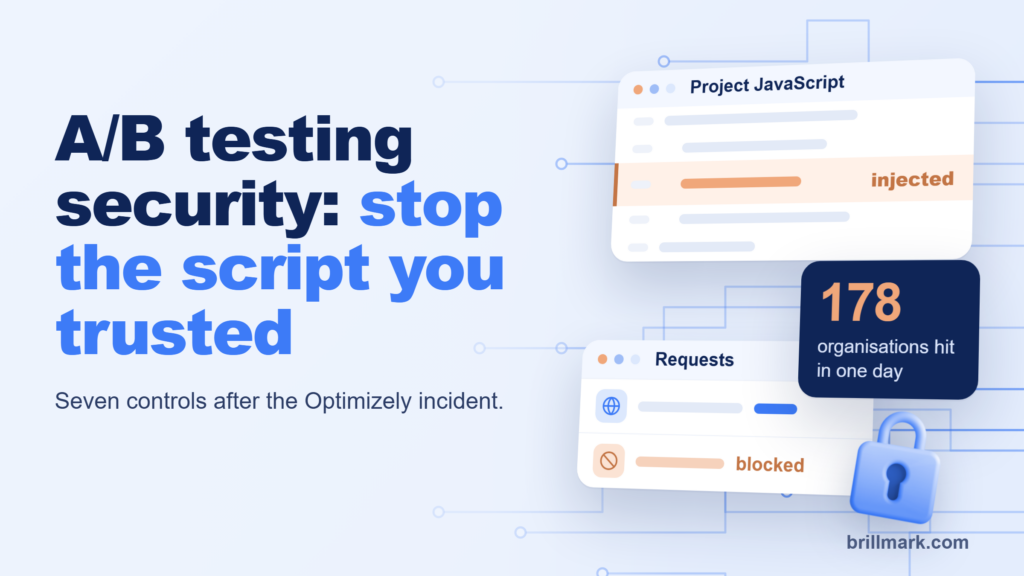
On 16 November 2026, malicious JavaScript reached visitors on the websites of 178 organisations, including the BBC and Zoom. None of those sites was hacked directly. The code arrived inside the Optimizely A/B testing snippet they already loaded on every page.
If you run A/B tests, your testing tool is part of your security perimeter. This is what happened in the Optimizely cyberattack 2026, how the attack worked, why normal checks missed it, and what to do this week.
Key facts about the Optimizely cyberattack 2026
- What: an attacker added malicious JavaScript to customer projects in Optimizely Web Experimentation, and Optimizely’s own CDN served it.
- How: a flaw in the Experimentation account signup flow, according to Optimizely. Optimizely says it was not a credentials breach.
- Scale: Report URI found malware in 188 of 1,611 snippets it checked, belonging to 178 organisations.
- Window: first injection seen at 04:21 UTC; mass clean-up began at 20:40 UTC.
- Payload: crypto address swapping, card skimming, cookie and screenshot theft, iPhone exploit kits.
What happened in the Optimizely cyberattack?
An attacker used a vulnerability in Optimizely’s signup flow to write code into customer projects, and Optimizely’s CDN delivered that code to visitors. Optimizely’s incident notice, posted at 01:02 UTC on 17 November, confirms an unauthorised party “exploited a vulnerability in Experimentation”.
The code went into Project JavaScript, the project-wide field where teams put custom code that runs on every page loading the snippet. The CDN was not compromised. It served what the projects contained, from Optimizely’s own domain, with the same certificate and the same file name. The victims’ own codebases never changed.
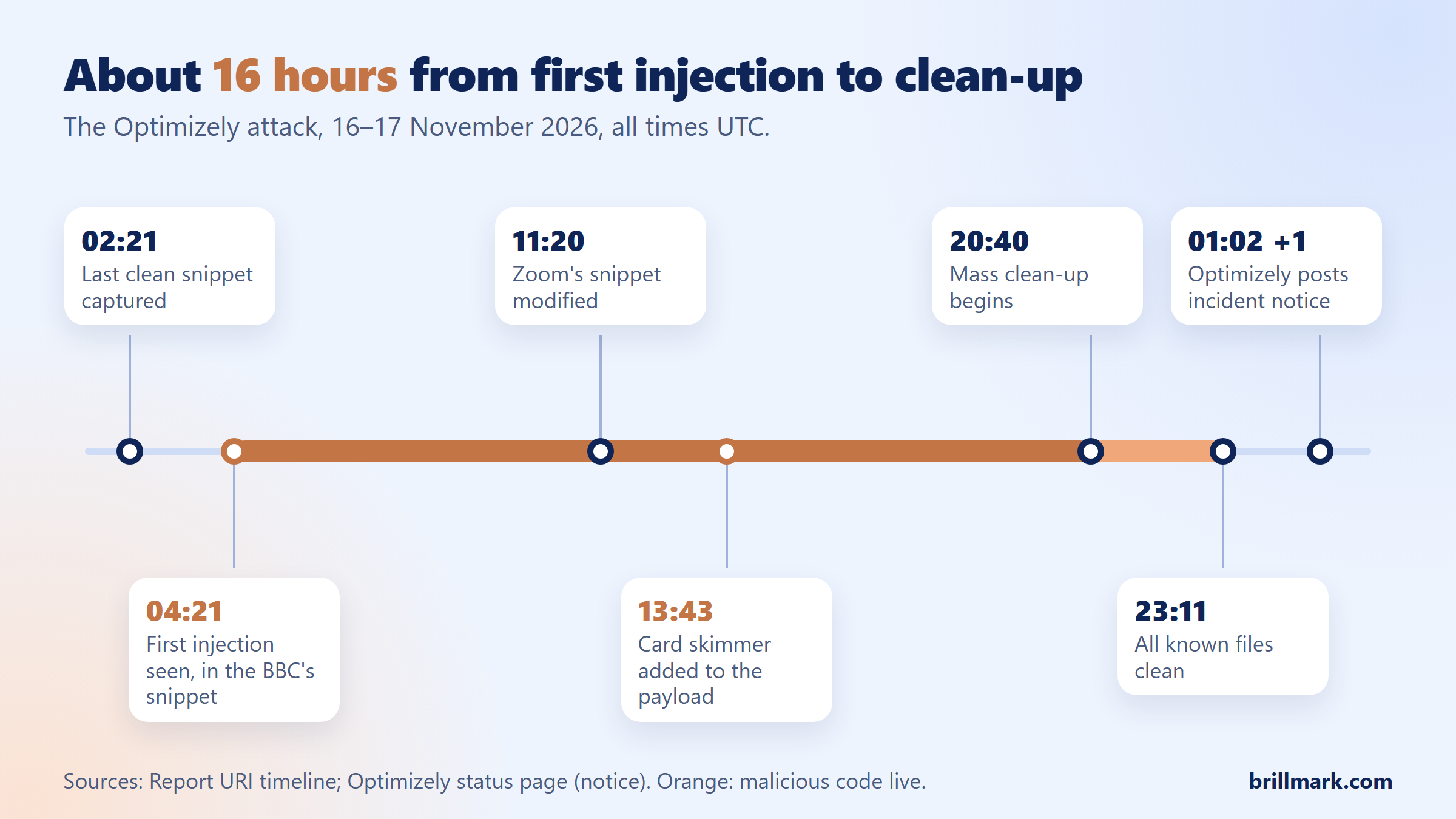
Report URI saw the first injection in the BBC’s snippet at 04:21 UTC. A card skimmer joined the payload at 13:43, mass clean-up began at 20:40, and every known file was clean by 23:11. Optimizely told CMSWire that fewer than 5% of its customers were affected and that it has contacted every Web Experimentation customer. No technical details of the root cause have been published, and Report URI expects the real victim count is higher than 178.
For about 16 hours, a script trusted by default on every page carried malware.
Which industries were affected?
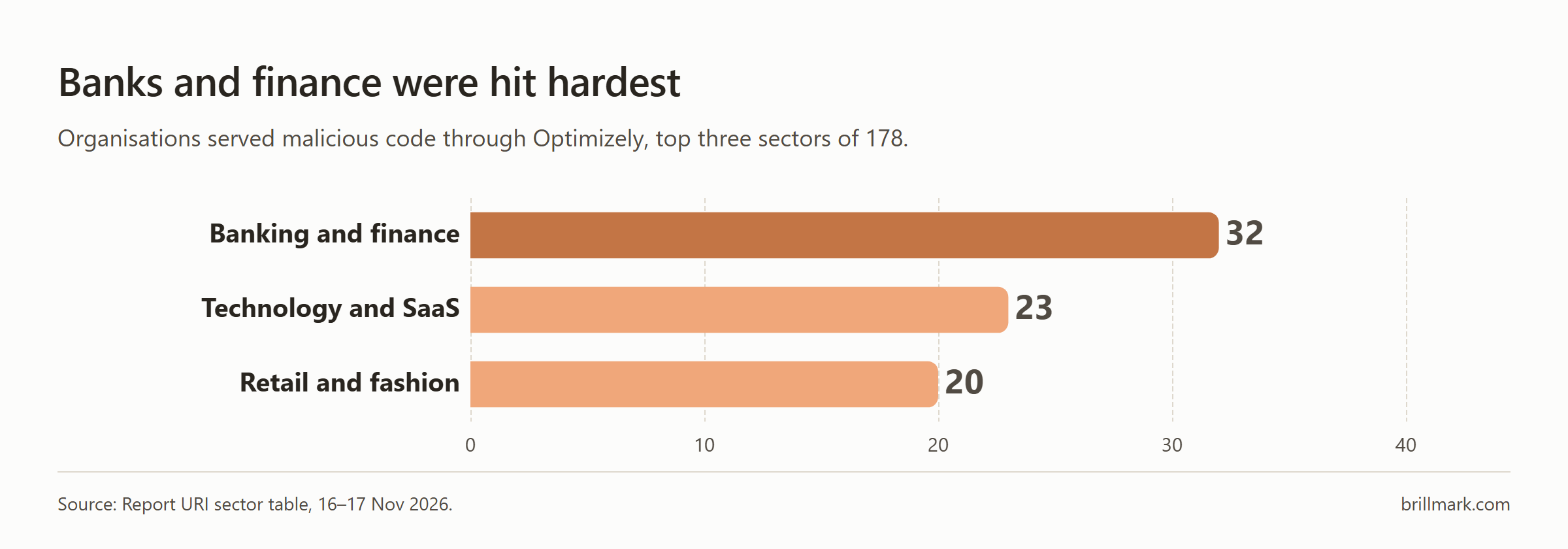
Banking and finance had the most affected organisations, 32 of the 178 in Report URI’s sector count, followed by technology and SaaS with 23 and retail and fashion with 20.
How did the malicious code work?
The attacker left the snippet alone and placed a small loader in Project JavaScript. The loaders came in three styles, as Report URI and Strobes describe: a plain script tag pointing at an attacker domain, the same address hidden in a base64 string decoded at runtime with atob(), and a full copy of the payload run with eval.
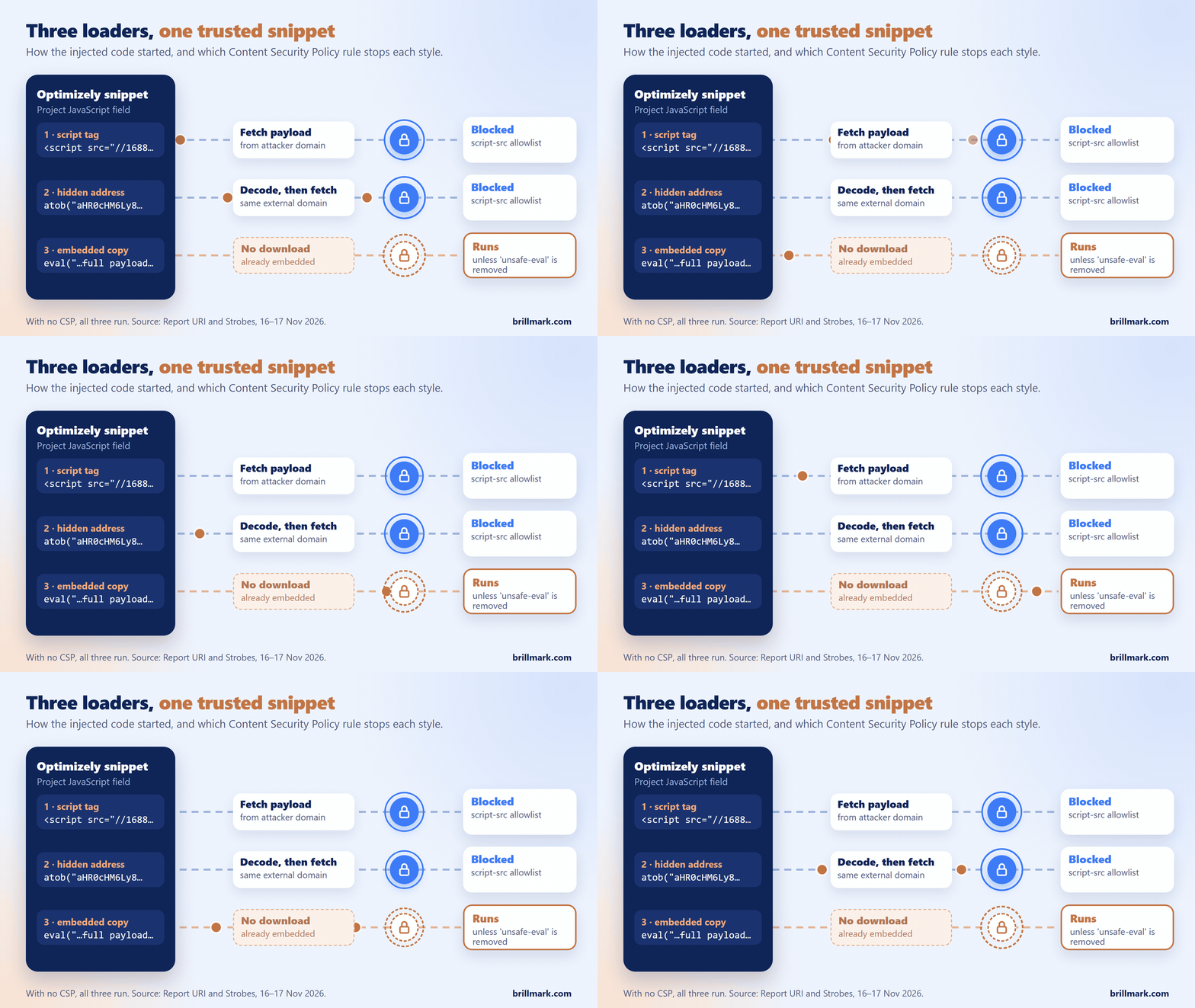
The difference matters to defenders. The first two fetch the payload from outside, so blocking the domain stops them. The third needs no download, so a blocked domain does nothing against it. Researchers also counted 26 rebuilds of the main payload in one day, and Strobes reports a 15-second cache header that let each new version reach visitors almost at once.
Once running, the malicious code had four jobs:
- Crypto clipper: swapped copied wallet addresses for the attacker’s.
- Data theft: when it swapped an address next to wallet or payment wording, it sent cookies that page scripts can read, and a screenshot, to the attacker’s server.
- Card skimmer: read card numbers typed into a site’s own checkout fields. Card fields inside a payment provider’s hosted iframe were out of its reach.
- iPhone exploits: sent older iOS versions to exploit kits.
These describe what the code was built to do. Confirmed harm to individual visitors has not been documented, so don’t assume every card or device on an affected site was compromised.
Why did standard security checks miss it?
Code review, static analysis and deployment pipelines check what your team ships from your own repositories. A change made inside a vendor dashboard never passes through any of them, so it reaches visitors without a single alert in your tooling.
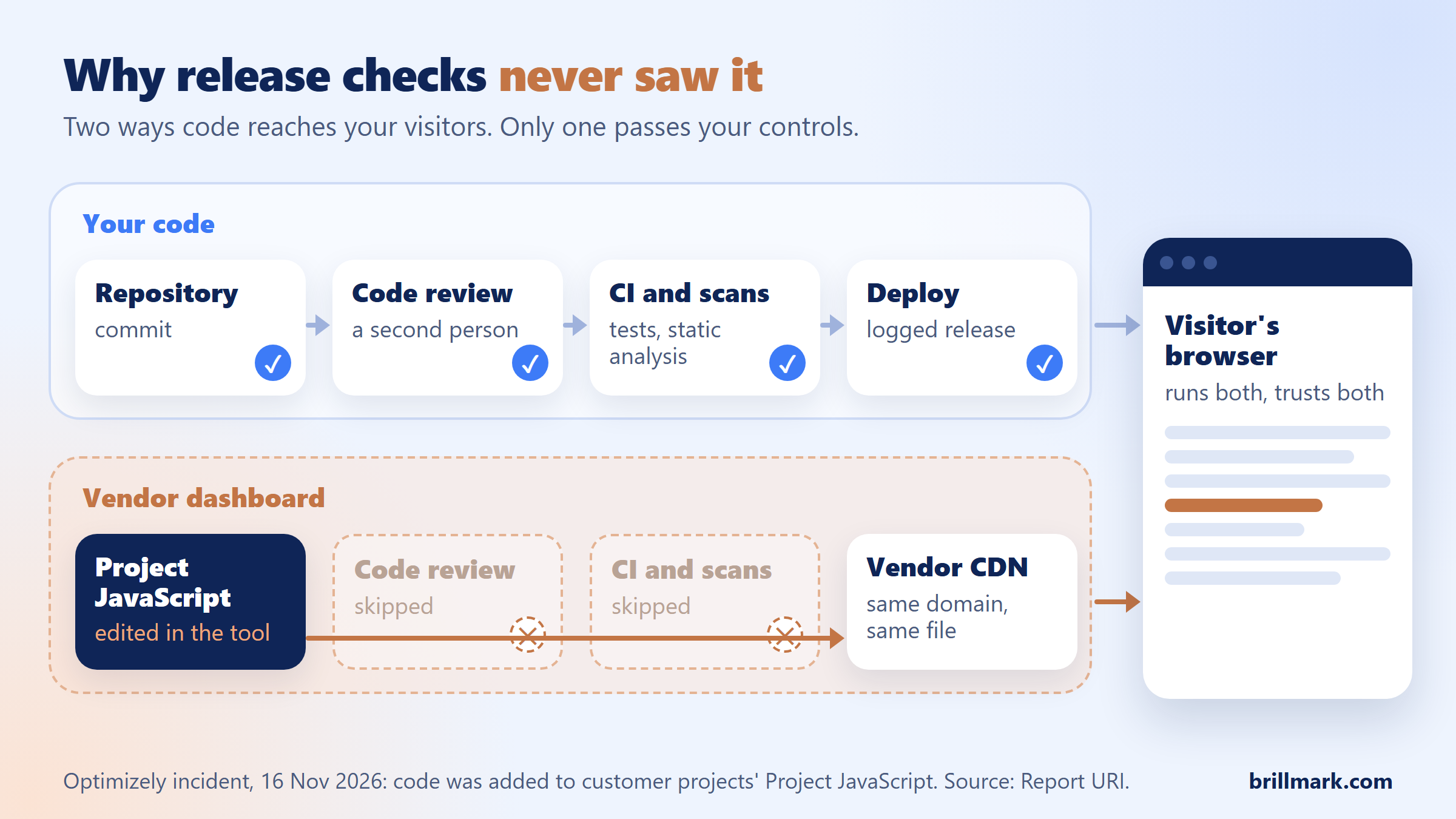
Checking the snippet afterwards doesn’t help either. BreachHistory, as quoted by Strobes, fetched twelve named bundles the next day and found nothing, because the clean-up had already happened. The only place this attack was visible was the visitor’s browser, so that is where you have to look.
The pattern isn’t new. In 2024 the Polyfill.io domain was sold and its new owner injected malicious code into a script used by more than 100,000 sites. From 13 November 2026, a smaller wave pushed a malicious script through Kissmetrics, StorifyMe and Minute Media scripts, per Report URI. If you don’t use Optimizely, the lesson still applies to every vendor script on your pages.
The incident is not connected to the vishing breach Optimizely confirmed in February 2026, which exposed business contact data in internal systems such as Zendesk and Salesforce. No link between the two has been shown.
What can a Content Security Policy do against this?
A Content Security Policy (CSP), a header that tells the browser which sources may run scripts and where data may be sent, was one of the few controls that limited this attack. Few affected sites had one that helped.
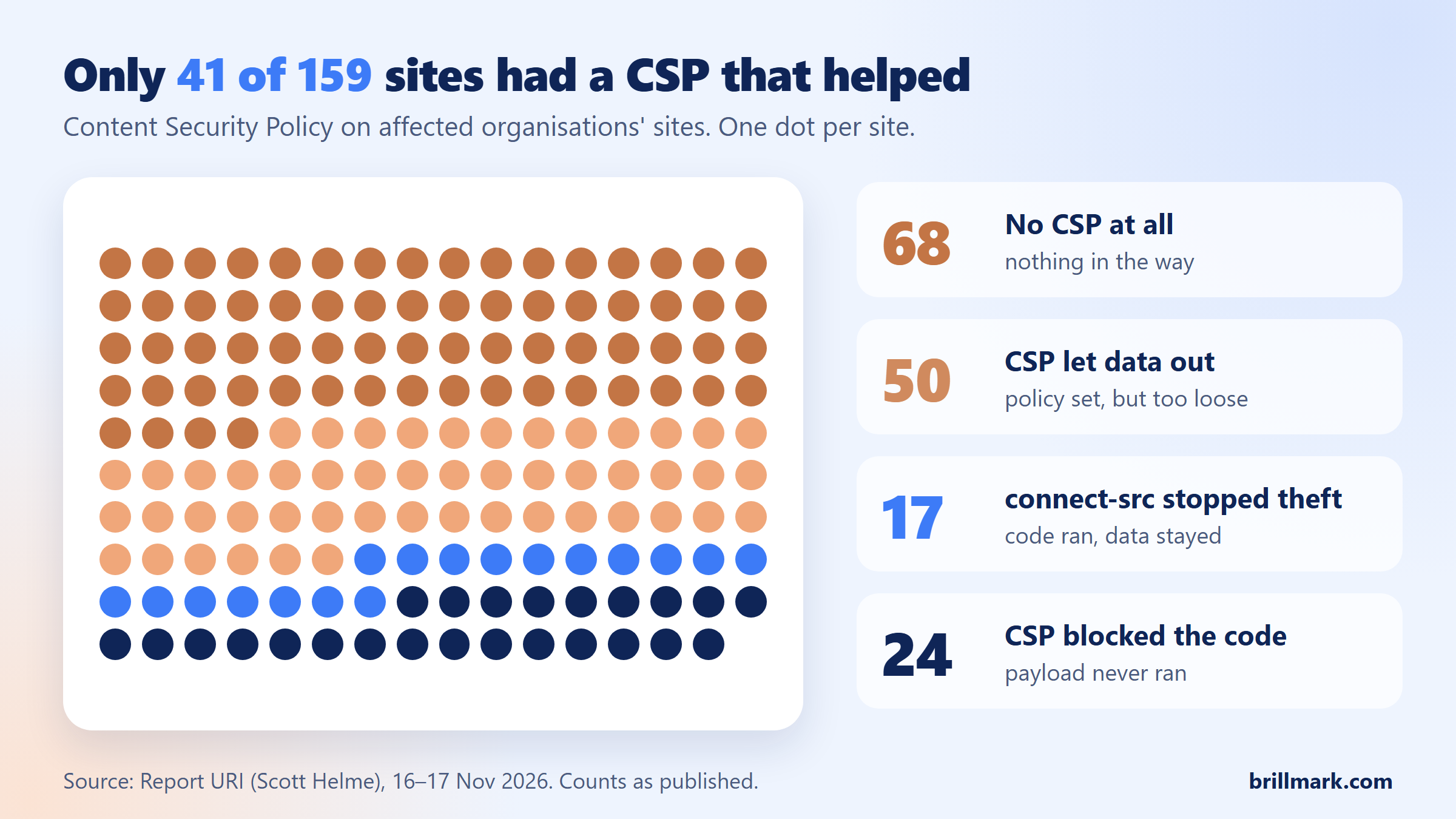
Of the affected sites Report URI categorised, 24 blocked the payload, 17 let it run but stopped the stolen data leaving with connect-src, 50 allowed both, and 68 had no CSP at all. What follows from that:
- A host allowlist in
script-srcstops the two loaders that download the payload. Allowing Optimizely’s CDN does nothing, because the code came from there. - A tight
connect-srcstops stolen data leaving, even when the code runs. - Removing
'unsafe-eval'blocks the embedded copy. Some Optimizely features have needed it, so check Optimizely’s CSP guide and test before you ship. - A nonce with
'strict-dynamic'passes trust to any script a trusted script loads, which gives a loader like this a way through. - A report-only policy shows violations and blocks nothing.
CSP limits what a bad script can do; it does not stop a trusted source from serving one.
What should A/B testing teams do now?
If you use Optimizely Web:
- Review every project’s Project JavaScript and experiment code for anything your team didn’t write. Save copies before removing it.
- Audit users, API tokens and integrations with write access, then rotate credentials.
- Search proxy, DNS and CSP logs from 04:00 UTC on 16 November for Report URI’s published indicators, such as
1688360.ccandwebshell.lol. - If your own card form, not a hosted payment iframe, loaded the snippet, treat cards entered during the window as possibly exposed.
For every third-party script:
- Keep an inventory of who can change each script, and where.
- Enforce a CSP with
script-srcandconnect-srcallowlists. - Keep experimentation and marketing tags off checkout pages.
- Monitor what actually loads in the browser.
- Remove tags nobody uses.
For a fuller set of controls, from 2FA to approvals and rollback, see our A/B testing security checklist.
That is also why our A/B test development work has a person review every line of custom code before a test reaches visitors: a QA pass that only checks how a page looks will pass code that looks fine and isn’t.
Why does tag sequencing matter here?
This incident raises the bar on controlling when and why scripts fire. The same discipline that stops a tracking tag firing before consent stops an unexpected script running unchecked. In Google Tag Manager, consent mode needs a default state set before any tag evaluates and an update the moment a visitor chooses; get the order wrong and you either break privacy law or lose data.
Experimentation adds one wrinkle. A test that changes the page often has to run before consent is known, while the tracking that measures it must wait. Teams that already plan for conditions, sequence and exceptions find it easier to say exactly which script should run, when, and why.
FAQ
How did the attacker get into Optimizely?
Optimizely says an unauthorised party exploited a flaw in the Web Experimentation account signup flow and used it to add code to customer projects. It says the flaw is fixed and the code removed. No technical write-up or CVE has been published.
Would a Content Security Policy have stopped the Optimizely attack?
Partly. A script-src allowlist blocks the loaders that download the payload, and a strict connect-src stopped stolen data leaving at 17 affected organisations. A report-only policy blocked nothing.
Can I confirm my site is clean by checking the snippet today?
No. The injected code was removed on 16 November, so today’s snippet tells you nothing about that day. Check your logs from 16 November instead.
What should I do if I visited an affected site that day?
Update your iPhone or iPad to the latest supported iOS, check any crypto transfer against the address you meant to use, and watch card statements if you typed card details into a site’s own checkout.
Running A/B tests with custom JavaScript on checkout, pricing or forms? BrillMark, an A/B testing development agency, builds, QAs and launches tests on Optimizely, VWO, Convert and AB Tasty, with every line of custom code reviewed by a person before release. Send us your next test and get a scope, hour estimate and QA plan, usually within one business day.
Sources: Optimizely status page and statements to BleepingComputer and CMSWire; Report URI; Strobes; Sansec; SecurityWeek. Published coverage from 16 to 19 November 2026. Details may change as Optimizely releases more information.
Make your website ready for the AI era.
AI is changing how people discover, evaluate, and interact with websites. We help you identify optimization opportunities across content, UX, technical performance, SEO, and conversion paths.