



Key takeaways from this guide about Headless CMT Native A/B Testing
- Headless CMS native A/B testing means variant creation, traffic splitting, and audience rules live inside the CMS itself. Rather than in a separate experimentation tool loaded by a client-side script.
- Native testing is strongest for content-level tests. Hero copy, imagery, offer blocks, and landing page modules that already exist as CMS entries.
- Native testing is weakest for behavioral targeting. As well as sequential testing statistics, server-side feature flags, and cross-device experiments.
- Most native implementations resolve the variant server-side or at the edge. Which removes the flicker problem that plagues client-side testing tools.
- Very few headless CMS platforms ship a full statistics engine. Most hand results off to your analytics stack, so you own significance testing.
- The common production pattern in 2026 is a hybrid. The CMS holds the variant content. Also, an experimentation or flagging layer holds the assignment logic. Lastly a warehouse or product analytics tool holds the stats.
- If your team ships more than a handful of tests per month, or needs guardrail metrics and revenue analysis, a dedicated experimentation platform still wins.
What is headless CMS native A/B testing?
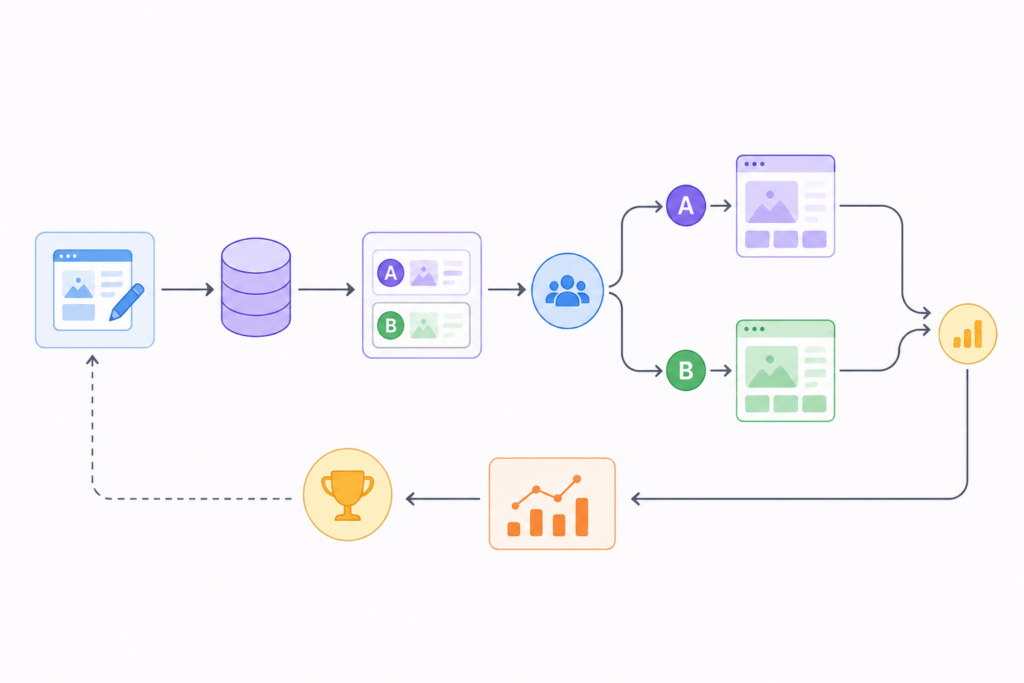
Headless CMS native A/B testing means you set up test versions and traffic splits directly inside your content management system. The CMS then delivers the chosen version through the exact same API call that fetches your page content.
No extra script modifies the page after it loads. The visitor only ever sees a single, ready-to-go version.
How It Differs From Classic A/B Testing
- Upstream Decisions: The system picks the variant before the browser renders the page, which improves performance and changes how you debug issues.
- Content Author Control: Content creators manage the variants themselves, rather than waiting for engineers to write JavaScript overrides.
What counts as “native” versus “integrated”?
Native functionality means features ship directly within the CMS. Native features include variant fields and custom personalization options. Integrated setups expose hooks for external software applications. An app marketplace allows external tools to plug in. This distinction matters greatly when pricing your tech stack.
Integrated architectures typically require paying for a secondary subscription.
- Native: variant modeling and traffic split configured in the CMS UI.
- Integrated: CMS supplies content, an external SDK decides who sees what.
- Custom: your own middleware reads a flag service and requests the matching CMS entry.
How does A/B testing work in a headless CMS architecture?
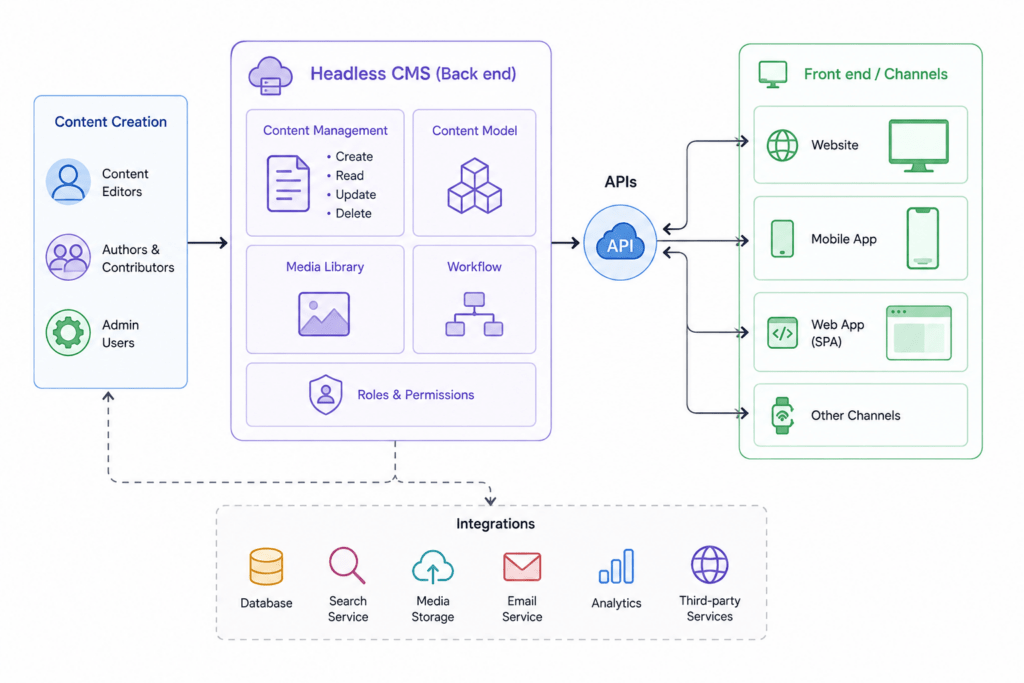
In a headless stack the rendering layer, usually Next.js, Nuxt, Astro, SvelteKit, or a mobile client, requests content from the CMS API. A/B testing inserts an assignment step into that request path. The assignment can happen in edge middleware, in the server-side render, or in the CMS delivery layer itself, and the resulting variant ID travels with the content payload.
Why does client-side A/B testing break on headless sites?
Client-side testing tools were built for older websites where page content stays fixed right away. Modern web apps load in steps, stream data, and update constantly. Because of this, an old script that waits for an element and swaps it ends up fighting the code.
Here are three main problems:
- Flicker (Flash of original content): The original view loads first, and then the tool updates it. Visitors see a quick flash of the old version.
- Hydration mismatch: Tools like React or Vue reset the page to match the server. This quietly undoes your test variant.
- Selector fragility: UI components use random class names that change with every build. This breaks your target elements.
What is server-side and edge-based A/B testing?
Server-side A/B testing assigns the variant on the server before HTML reaches the browser. Edge-based testing does the same thing in a CDN worker close to the visitor. Both eliminate flicker because the browser only ever receives one version of the markup, and both keep the assignment logic out of the client bundle.
The caching tradeoff: You cannot serve a personalized page from a single cached object. Instead, you must include the test variant in your cache keys, or split traffic at the route level so your CDN caches each version separately.
Standard Request Flow
- Visitor requests a URL: A user loads the page.
- Edge middleware assigns a bucket: The system reads or sets a cookie, hashing the visitor ID to place them into a test group.
- Variant resolution: The middleware rewrites the request to match that specific variant or adds a header.
- Content fetching: Your framework pulls the correct content or CMS entry for that version.
- Rendering and tracking: The server builds the HTML with the variant already baked in, and analytics record the view.
- Persistent tracking: The cookie saves the assignment so the user sees the exact same version on future visits.
Which headless CMS platforms offer native A/B testing?
Native support ranges from a first-class experimentation product to nothing at all. Contentful, Storyblok, Contentstack, Builder.io, Sitecore XM Cloud, and Optimizely lean furthest toward native capability. Sanity, Strapi, Payload, Directus, and Prismic generally expect you to bring your own assignment layer.
| Platform | Native capability | Where assignment happens | Built-in statistics |
| Contentful | Personalization and experimentation product line, built on the Ninetailed technology Contentful acquired in 2024 | Edge or server SDK | Basic reporting, limited stats depth |
| Storyblok | Personalization and A/B capability via first-party and partner apps, variant fields in the visual editor | Server or edge | Reporting only, no full stats engine |
| Contentstack | Personalize product with audiences, experiences, and variant content | Edge delivery | Experience-level metrics |
| Builder.io | Native A/B testing on visual content entries | Server or client, configurable | Built-in conversion reporting |
| Sitecore XM Cloud | Personalize and Content Hub integration, embedded in the composable suite | Edge | Yes, part of the CDP and personalization suite |
| Optimizely (CMS plus Feature Experimentation) | Full experimentation platform alongside the CMS | Server, edge, or client SDK | Yes, sequential and fixed-horizon stats |
| Sanity | No native experimentation. Variant modeling via custom schema plus external flags | Your middleware | No |
| Strapi | No native experimentation. Plugin ecosystem and custom fields | Your middleware | No |
| Prismic | Slice variations support content variants, assignment is yours to build | Your middleware | No |
| Payload, Directus | No native experimentation, fully custom | Your middleware | No |
- Verify current feature availability before you publish. Composable vendors reshape personalization packaging frequently, and several of these products changed names or tiers in the last two release cycles.
What are the limitations of native CMS A/B testing?
Native CMS testing handles content swaps well and analysis poorly. Most platforms give you variant delivery and impression counts, then stop short of the statistical machinery an experimentation program needs: power calculations, sequential testing corrections, guardrail metrics, segment-level results, and revenue attribution.
Specific gaps to plan around:
- No power analysis. The CMS rarely tells you how long a test must run, so teams call winners early on underpowered samples.
- Weak multiple-comparison handling. Testing four variants against a control inflates false positive rates unless the tool corrects for it.
- Limited metric depth. Click and conversion counts are common. Average order value, revenue per visitor, and retained conversion usually are not.
- No mutual exclusion. Running two overlapping tests on the same template without exclusion groups contaminates both.
- Content-only scope. Native tools cannot test pricing logic, checkout flows, recommendation algorithms, or anything not modeled as a CMS entry.
- Cache and cost pressure. Variant-aware caching increases origin requests and edge compute, which shows up on your hosting invoice.
- QA surface area. Every variant multiplies the number of permutations that authors and reviewers need to check.
Headless CMS native testing versus dedicated experimentation platforms
Native CMS testing optimizes for author autonomy on content changes. Dedicated experimentation platforms optimize for statistical rigor and test velocity across the full product surface. Teams running a handful of landing page tests per quarter usually get more value from native. Teams running a program get more value from a dedicated tool feeding on CMS content.
| Dimension | Native CMS testing | Dedicated experimentation platform |
| Who builds the test | Content author | Analyst, engineer, or CRO specialist |
| Scope | Content and layout modules | Content, features, pricing, algorithms, apps |
| Statistics | Reporting-level | Frequentist and Bayesian engines, sequential testing |
| Targeting | Audience rules, geography, referrer, basic traits | Behavioral, cohort, warehouse-based, feature-flag driven |
| Flicker risk | Low, assignment is upstream | Low for server-side, high for legacy client-side setups |
| Time to first test | Days | Weeks, including SDK integration and metric plumbing |
| Marginal cost per test | Low | Low after setup, higher fixed cost |
| Program readiness | Limited above roughly five concurrent tests | Designed for concurrency and exclusion groups |
What does the hybrid pattern look like?
The pattern most mature teams land on separates three responsibilities. The CMS stores every variant as first-class content so authors can edit it. A flagging or experimentation service owns bucketing and exposure logging. A warehouse or product analytics tool owns the analysis, joining exposure events to downstream revenue.
This keeps authors out of code, keeps engineers out of copy edits, and keeps statistical decisions in a system that was built for them.
How do you set up an A/B test in a headless CMS?
Step-by-Step Experimentation Guide for headless CMS
- Define your goal and metrics: Choose one primary metric to measure success. Add two or three guardrail metrics. Such as bounce rate, add-to-cart rate, and page load time. To catch unintended negative impacts.
- Calculate sample size: Use your baseline conversion rate and minimum detectable effect (MDE) to set your stopping rule before you launch. Do not change this rule mid-test.
- Model variants in your CMS: Add a variant field to your existing content type, or create a separate entry tied to a clear variant ID (for example,
hero_copy_v2). Keep IDs simple and readable. - Set up user assignment: In Next.js, use edge middleware to set a bucketing cookie, hash the visitor ID, and direct users to the correct route. Save the choice so returning visitors stay in the same group.
- Track exposure: Fire an event when the page renders. This event must include the experiment ID, variant ID, and visitor ID. Clean exposure tracking is essential for valid results.
- Configure caching: Add the variant to your cache keys, or pre-render each variant as its own independent, cacheable route.
- Test every variant (QA): Verify the control path with cookies cleared, test the variant path, ensure bots are excluded, and check everything in your preview environment across all breakpoints.
- Run until complete: Stick to your planned sample size. Avoid checking or peeking at results early unless your tool is built for sequential testing.
How do you avoid flicker and layout shift in headless CMS tests?
Flicker goes away when you choose the test version before sending the HTML. Assign users at the edge or on the server, ship one complete version of the code, and never change the DOM later. If a client-side test is your only option, use CSS to lock the element size so the layout does not jump around.
Pre-Launch Checklist
- View the raw source: Check the page source code—not the live inspector—to confirm the variant is baked into the initial HTML.
- Measure layout shift: Check Cumulative Layout Shift (CLS) for every version. A taller element can quietly hurt your Core Web Vitals score.
- Test your cookies: Verify that the bucketing cookie stays active after a hard refresh and when opening a new tab.
- Test with JavaScript off: Turn off JavaScript to confirm the server correctly rendered the proper version.
How do you measure results when the CMS has no statistics engine?
Tracking and Analysis
Do not calculate test results inside your CMS. Instead, send your experiment ID and variant ID to your analytics tool with every event.
The main rule: You must cleanly link user exposure to their final outcome at the individual visitor level.
Where to analyze: Use GA4 custom dimensions, product analytics tools, or a data warehouse model.
A minimal measurement contract:
| Field | Example | Why it matters |
| experiment_id | pdp_hero_2026_q3 | Groups the test across events |
| variant_id | control, variant_a | The unit of comparison |
| visitor_id | Stable first-party ID | Prevents double counting across sessions |
| exposure_timestamp | ISO 8601 | Enables sequential and cohort analysis |
| Outcome events | add_to_cart, purchase, revenue | The metrics you actually decide on |
When should you use native headless CMS testing versus a dedicated tool?
Use native CMS testing when the change is content, the volume is low, and the authors are the ones iterating. Use a dedicated platform when you need statistical guarantees, concurrent tests, behavioral targeting, or tests that reach beyond content into product logic and pricing.
| Situation | Recommended approach |
| Hero copy, imagery, and offer block tests on marketing pages | Native CMS |
| Regional or language-based content variation | Native CMS personalization |
| Pricing page structure or plan packaging tests | Dedicated platform |
| Checkout or funnel tests spanning multiple steps | Dedicated platform, server-side |
| More than roughly five concurrent tests | Dedicated platform with exclusion groups |
| Tests requiring revenue per visitor as primary metric | Dedicated platform plus warehouse |
| Feature rollouts with a kill switch | Feature flagging service |
| Mobile app and web parity tests | Dedicated platform with mobile SDKs |
Frequently Asked Questions
Does headless CMS A/B testing hurt SEO?
Server-side and edge testing are completely safe for SEO when implemented correctly:
- Keep URLs consistent: Serve the same URL for all variants.
- Handle bots properly: Treat search crawlers the same as users, or exclude them from tests entirely.
- Use canonical tags: Add
rel="canonical"if variants sit on separate URLs. - Clean up after tests: Remove redirect-based tests as soon as the experiment concludes.
Can you A/B test without a client-side script?
Yes. Edge middleware or server-side rendering can assign variants and render the winning version before any JavaScript executes. This is the best approach for headless setups because it stops page flicker and keeps client bundles lean.
Does A/B testing break CDN caching?
It complicates caching rather than breaking it. To make it work:
- Include the variant directly in your cache key so each version caches independently.
- Alternatively, pre-render variants as distinct, separate routes.
Note: Expect a slightly lower cache hit ratio and higher origin load while a live test runs.
How many visitors do you need per variant?
It depends entirely on your baseline conversion rate and the minimum detectable effect you want to find. For instance, a site converting at 2 percent that wants to detect a 10 percent relative lift usually needs tens of thousands of visitors per variant. Always run a formal power calculation before launch.
Can content authors run tests without engineering help?
Yes, but only after the initial setup. The first test requires engineering work to build middleware, cookies, cache keys, and exposure tracking. Once that plumbing is in place, content authors can freely create and launch variants on their own.
What is the difference between personalization and A/B testing in a headless CMS?
- A/B Testing: Splits traffic randomly to learn which version performs better overall.
- Personalization: Deliberately routes defined audiences to specific content matched to them, with no randomization and no causal inference.
Many CMS platforms bundle both features under one product name, leading teams to assume they are running experiments when they are only doing targeted content delivery.