





Server-Side TrackingThird-party cookie deprecation gets most of the attention, but the bigger threat to measurement accuracy has already happened. Safari’s Intelligent Tracking Prevention, Firefox’s Enhanced Tracking Protection, and Chrome ad blockers have reduced first-party analytics data for years. Client-side GA4 tags run inside the browser, where privacy controls limit the data they can capture. Over time, the gap between actual user behavior and analytics reports keeps growing. Many teams never identify the reason behind these data gaps.
GA4 server-side tagging does not remove consent requirements or recover tracking that users reject. However, it solves another major issue: data loss caused by ad blockers, browser limits, and script failures.
Understanding this difference is the first step toward a successful server-side GTM implementation. The goal is to improve data reliability, not bypass consent. Many teams confuse these concepts and end up solving the wrong problem while creating compliance risks.
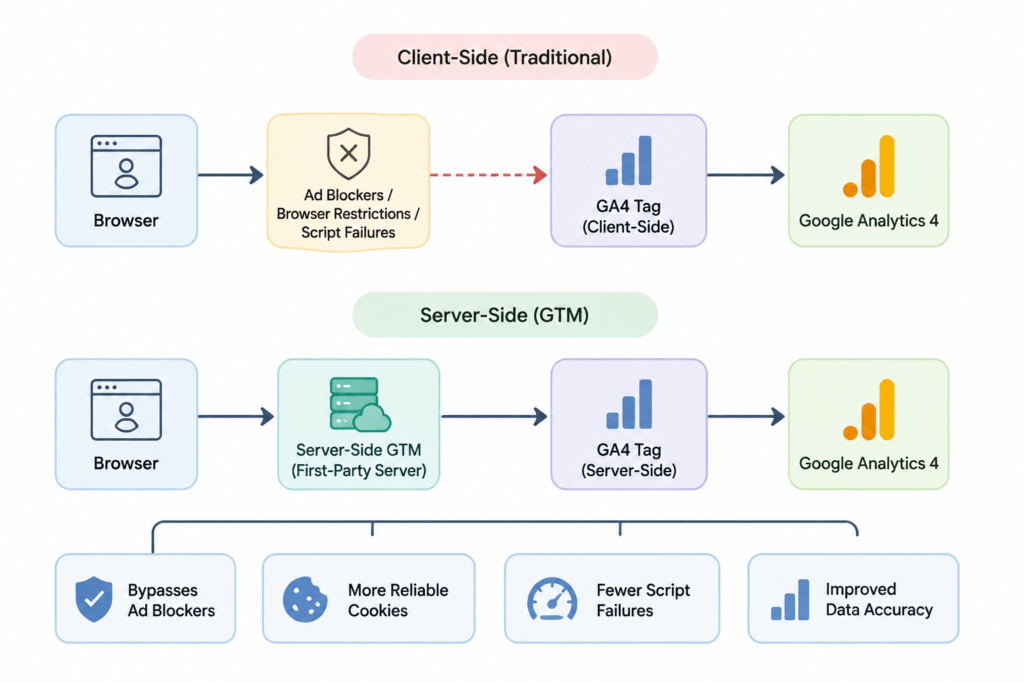
Factors Reducing Client-Side Tracking Accuracy
Before deciding server-side is worth the migration effort, it’s worth being precise about what’s failing and why, because the diagnosis determines whether the investment is justified.
Cookie lifespan restrictions. Safari’s ITP caps first-party cookie duration to seven days when set via JavaScript, which is most of how GA4 sets its _ga cookie by default. A returning visitor after a week looks like a new user, fragmenting session data and inflating new user counts while deflating actual return visit metrics. For businesses with longer consideration cycles, subscription products, or repeat purchase patterns measured in weeks rather than days, this single restriction can distort retention and lifetime value reporting in ways that are easy to miss unless someone is specifically looking for the pattern.
Ad blockers targeting the request itself: Many blocklists don’t just block third-party requests; they block requests to google-analytics.com and similar domains directly, regardless of first-party or third-party context. Name-based filtering can identify and block a client-side GA4 tag that sends requests directly to that domain, even without relying on cookie-based detection. Estimates of ad blocker adoption vary by market and audience, but for certain demographics, particularly technically sophisticated or privacy-conscious visitors, the share of blocked traffic can be substantial enough to meaningfully skew which segments show up at all in reporting.
Script load failures and race conditions. Slow network connections, aggressive browser tab throttling, and users navigating away before a tag fires all cause silent data loss that has nothing to do with privacy settings. These losses are invisible in reporting; there’s no error, just an event that never arrived. Mobile traffic is particularly susceptible here, since intermittent connectivity and battery-saving throttling behaviors interrupt script execution more often than on desktop.
Each of these problems shares a common trait: they happen in the browser, which is a hostile environment for reliable data collection that keeps getting more hostile with every browser update and every new blocklist release. Moving the point of data transmission to a server changes the equation fundamentally, because a server isn’t subject to any of these browser-level restrictions.
Moves Data Processing Away From the Browser
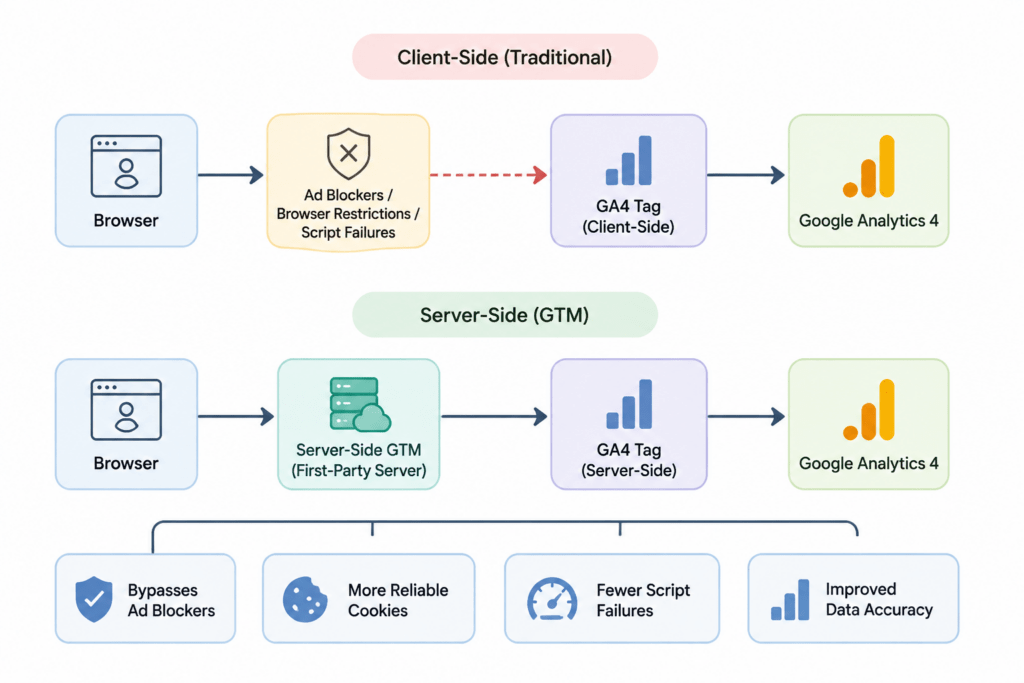
A server-side GTM container uses Google Cloud Run (or equivalent cloud infrastructure) to process requests between the browser and the analytics endpoints before forwarding data. Instead of the browser sending events directly to Google Analytics, Meta, or other destinations, it sends events to your own server-side container, hosted on a first-party subdomain, which then forwards that data server-to-server, applying whatever transformation and consent logic you’ve configured along the way.

This restructuring solves several of the problems above simultaneously, and understanding each mechanism helps clarify why the architecture works the way it does:
- First-party domain requests: because the browser is talking to your own subdomain (for example, sgtm.yourdomain.com) rather than a recognizable third-party domain, many blocklist rules that target third-party analytics endpoints by name no longer apply. The request looks, from the browser’s perspective, like any other first-party API call to your own site.
- Longer-lived, more reliable cookies: cookies set server-side via HTTP response headers are treated differently by ITP than cookies set via JavaScript, and can persist longer, improving the accuracy of returning visitor and session data. This is one of the more technical but consequential differences, since it directly affects how many “new” users are actually returning visitors misclassified due to cookie expiration.
- Reduced client-side payload: less JavaScript executing in the browser means fewer opportunities for a slow connection or an interrupted page load to prevent an event from being recorded at all, since much of the processing shifts server-side after the initial event is captured. The browser’s job becomes simpler: fire one request to your own domain and let the server handle the rest.
None of this changes what consent permits. If a user has declined analytics storage, server-side GTM should honor that decision exactly as faithfully as client-side GTM does, and building it any other way creates legal risk rather than data accuracy. This point is worth repeating because it’s the one most frequently misunderstood by teams evaluating this migration for the first time.
The Consent Layer Still Applies
This is where server-side implementations frequently go wrong: teams treat the server container as a way to route around consent restrictions rather than a way to route around technical unreliability, and those are fundamentally different goals with fundamentally different legal implications.
Consent state established client-side through Consent Mode v2 defaults and updates needs to be passed to the server container using the gcs parameter on every event. The server container should then apply the same consent logic used by client-side tags.
If analytics storage is denied, the server container should not forward that event to GA4 with identifying parameters, even though the request has already reached your own server.
A server container that ignores incoming consent signals and forwards everything by default is not a data accuracy improvement. It is a compliance liability presented as a tracking solution.
Any vendor or agency proposing a server-side setup that treats consent as optional, or something that only needs to be handled client-side, should be considered a red flag during evaluation.
What to Consider Before Implementing Server-Side GTM
Client identifier consistency. Server-side setups often introduce a first-party cookie set by the server container itself, separate from the standard _ga cookie. Decide early whether you’re extending the existing GA4 client ID or introducing a new server-managed identifier, since mixing approaches inconsistently across pages creates duplicate user counting rather than solving it. This decision should be documented and applied consistently across every property and subdomain involved in the migration, not decided ad hoc page by page.
Preserving IP and user agent data correctly. Because requests now pass through your server before reaching Google Analytics, the server container needs to explicitly forward the original client IP and user agent using the appropriate headers. Without this, geolocation and device data can degrade rather than improve, since GA4 would otherwise see your server’s IP address instead of the visitor’s. This is a common oversight in rushed implementations, and it’s one of the easier things to test for before launch by simply comparing geolocation reports before and after the switch.
Monitoring the transform and forwarding logic. A server-side container isn’t a passive pipe; it applies transformations, and misconfigured transforms can silently drop or alter fields. Regular comparison between client-side and server-side event volume, run for at least a few weeks post-launch, is the most reliable way to catch a broken transform before it becomes months of bad data. Setting up a dashboard that tracks discrepancy percentage between the two data streams during the transition period gives an early warning system that most teams skip in their rush to complete the migration.
Cost and maintenance overhead. Server-side containers run on paid infrastructure and require ongoing maintenance, unlike the free client-side GTM container. For lower-traffic sites, the accuracy gains may not justify the operational cost, and that tradeoff is worth calculating honestly before migrating. Traffic volume, the complexity of destinations being forwarded to, and the internal engineering capacity available to maintain the container over time should all factor into this calculation rather than treating server-side as a default best practice regardless of scale.
Ongoing ownership matters: Unlike a client-side container that marketing or analytics teams can often maintain with limited engineering support, a server-side container typically requires occasional engineering involvement to manage cloud infrastructure costs, apply security updates, and resolve deployment issues. Teams should define ownership responsibilities before launch to avoid a common failure mode: a server container quietly becoming outdated after the original implementation team moves on to other projects.
Where a Server-Side GTM Implementation Pays Off
Organizations that migrate carefully and want to improve GA4 data accuracy tend to see the clearest gains in returning visitor accuracy, particularly on Safari-heavy traffic segments, and in overall event volume recovered from ad blocker interference. Conversion tracking for paid channels often improves as well, since server-side forwarding to platforms like Meta and Google Ads can happen even when the browser itself would have blocked the client-side pixel entirely, which matters directly for return on ad spend calculations that depend on accurate conversion attribution.
What doesn’t improve, and shouldn’t be expected to improve, is data from users who have explicitly declined consent. Server-side tracking is a fix for technical data loss, not a workaround for user choice, and any implementation plan that blurs that line is solving the wrong problem while creating exposure the organization didn’t need to take on.
Improve Your GA4 Data Accuracy With Brillmark
Browser restrictions, cookie limitations, ad blockers, and tracking failures can create significant gaps between actual user behavior and reported analytics data. Brillmark helps businesses identify these measurement issues and implement reliable solutions using GA4, GTM, server-side tracking, and consent-aware analytics strategies.
Our team helps you build a stronger tracking foundation by improving data quality, maintaining compliance, and ensuring your analytics setup delivers the insights needed for better business decisions.