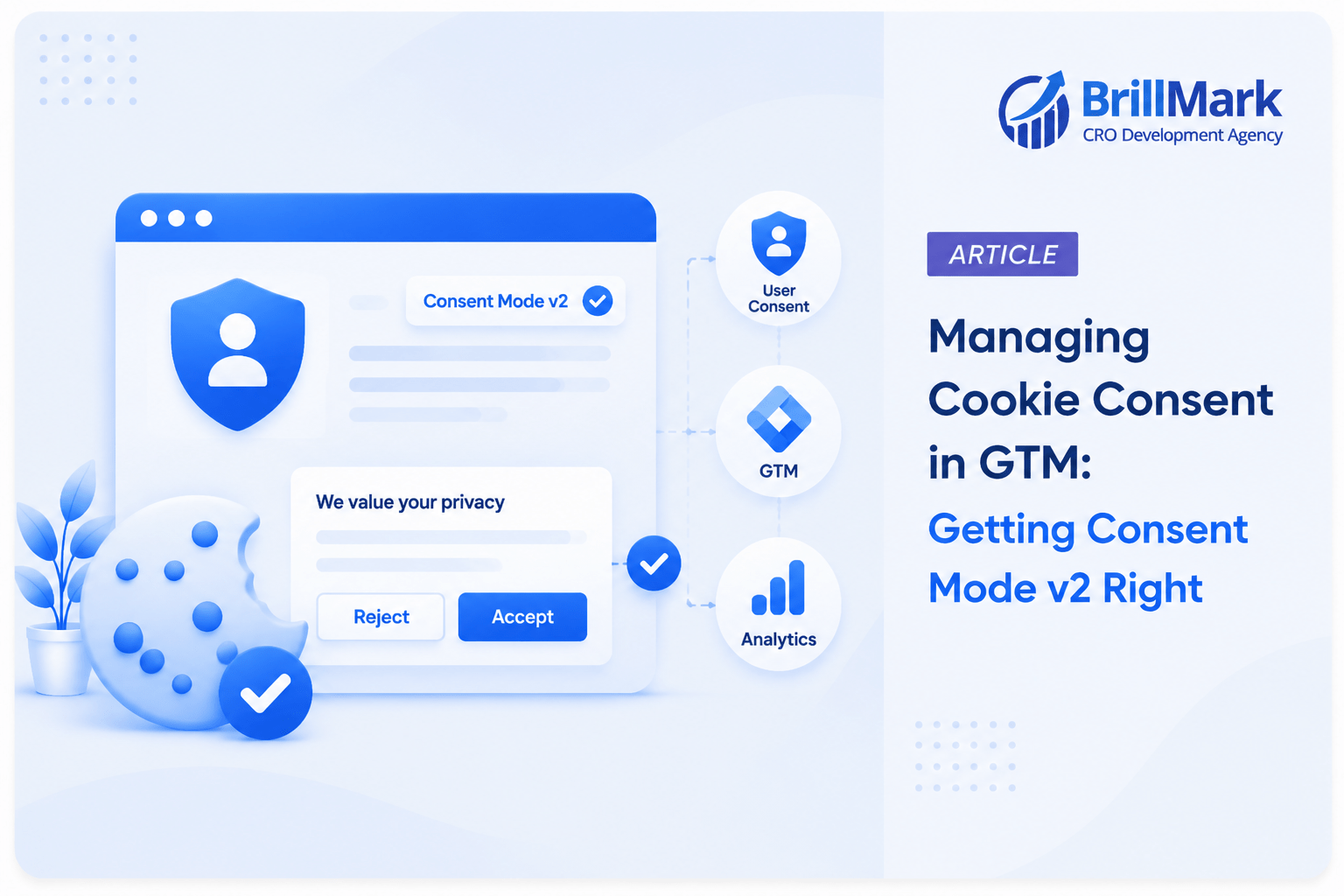
Cookie consent used to be simple, at least mechanically. A banner appeared, a script either loaded or it didn’t, and that was more or less the end of the conversation. Google’s Consent Mode v2 changed that calculus entirely. Tags no longer live in a binary “loaded or blocked” world; they live in a state machine, one that shifts from a default, privacy-safe posture to an updated, user-authorized posture, sometimes mid-session, sometimes based on where in the world the visitor happens to be, and sometimes based on choices that can be revised more than once in a single visit.
Get the sequencing wrong, and there are two distinct ways to fail. Both are expensive, but in different ways.
Fire tags too early, and you collect data before users give consent. This can create a compliance violation with real regulatory consequences under GDPR and similar frameworks.
Fire them too conservatively, or fail to re-check consent after users grant it, and you quietly lose data you have permission to collect. This later appears as unexplained reporting gaps, broken attribution, and analysts arguing over numbers that do not reconcile.
Consent Mode v2 exists to help solve this problem. But it only works when implemented in the right order, with the right defaults, and with enough testing to catch places where the logic quietly breaks.
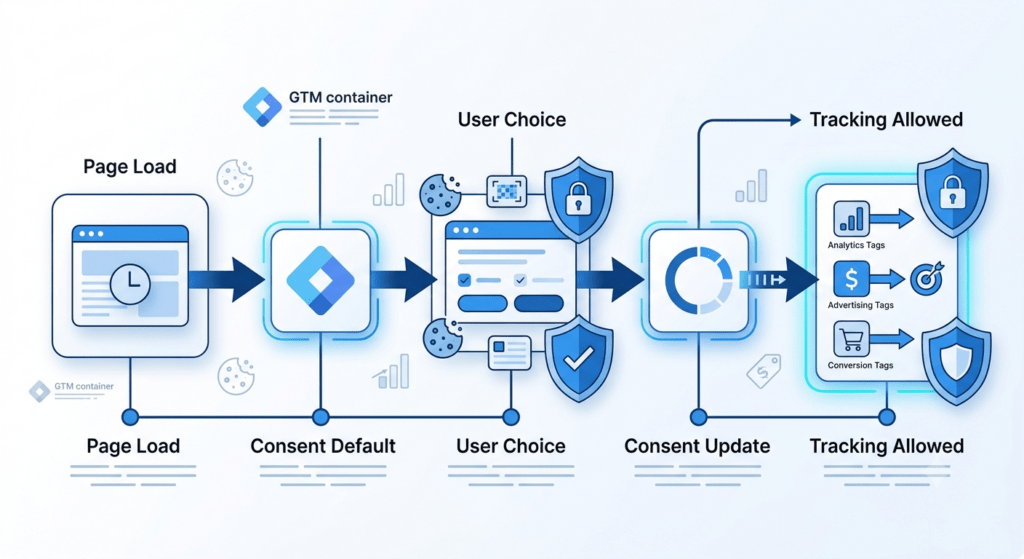
The Core Problem: Timing, Not Just Permission
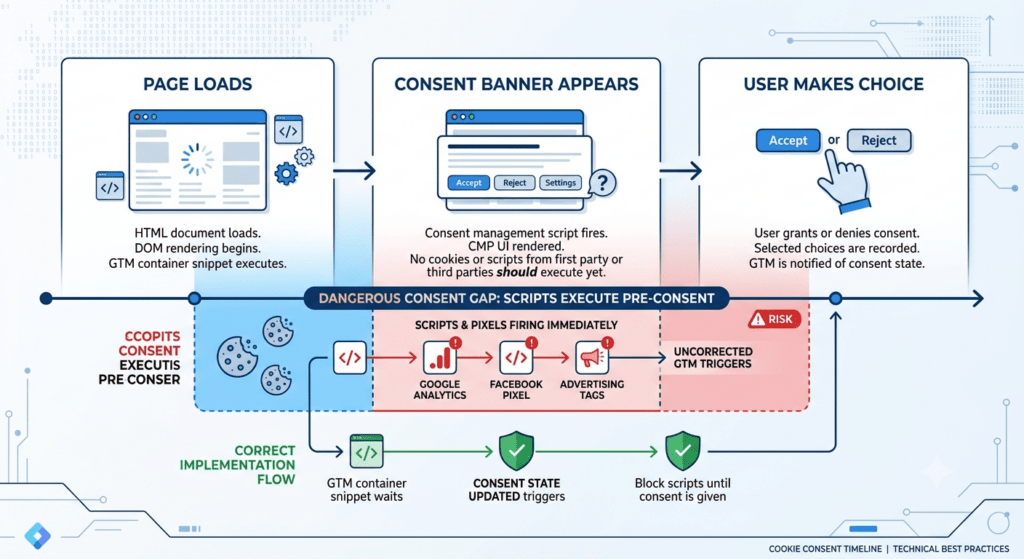
Most people think about consent as a permissions question: should this tag fire or should it wait for user approval? That framing isn’t wrong, but it misses a critical issue: timing. Page load happens before users make any choice. The banner has not rendered yet, and users have not clicked anything. However, scripts may already execute, cookies may already set, and network requests may already fire.
Your consent setup needs something to control tag behavior during this gap between page load and user decision. That control is the Consent Default. Its configuration determines whether your entire consent architecture works correctly or fails under real-world traffic.
The implementation, in practice, breaks into four sequential stages, each of which depends on the one before it being correct.
1. Why Consent Default Should Fire First
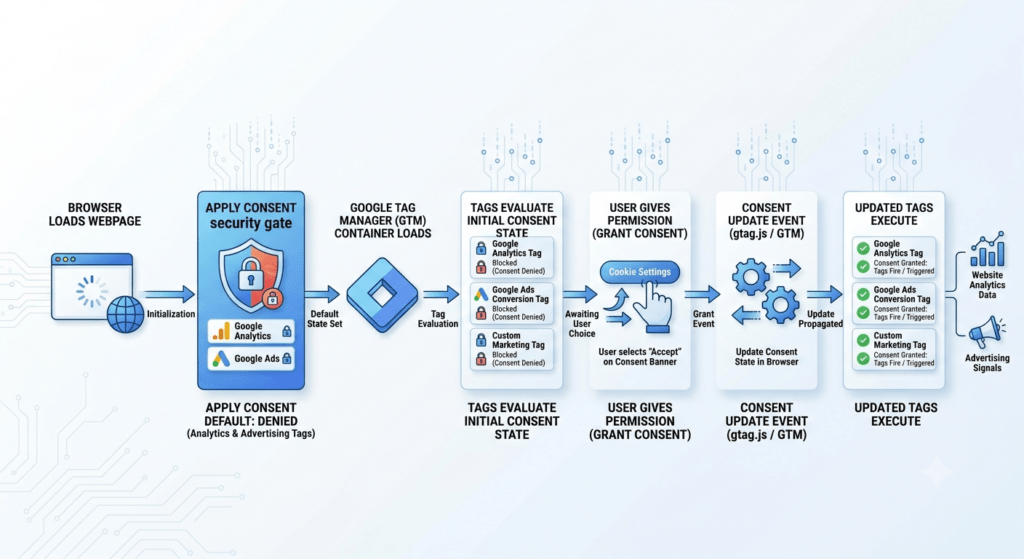
Consent Default must execute before any other tracking scripts, analytics tags, or marketing pixels load. This establishes the initial consent state for the user and ensures that all subsequent tags follow the correct privacy rules.
The safest and most widely recommended pattern is to set this directly in the page <head>, before gtag.js or the GTM container snippet even loads. Relying on GTM itself to set the default introduces a race condition, since the container has to load and parse before any tag inside it can run, and by then other scripts may have already executed.
js

gtag('consent', 'default', {

  'ad_storage': 'denied',

  'analytics_storage': 'denied',

  'ad_user_data': 'denied',

  'ad_personalization': 'denied',


  'wait_for_update': 500
});
Every relevant consent type starts denied. Nothing gets storage access, whether that’s a cookie, local storage, or any persistent identifier, until either the user actively grants it or a regional rule overrides the default for that visitor’s jurisdiction.
The wait_for_update parameter is one of the most commonly missed parts of Consent Mode. It can also have a major impact on how your implementation behaves.
It tells consent-aware tags to wait for a specified number of milliseconds for a consent update before firing based on the default consent state.
Without it, a tag may fire while consent is still set to denied and fail to fire again after the user grants consent. From the tag’s perspective, its initial firing opportunity has already passed.
The timeout value matters too. Set it too short, and a slow-loading CMP may not deliver the user’s consent choice before the waiting period ends. Set it too long, and you can introduce a noticeable delay, especially for users on slower mobile connections.
2. Regional Defaults: Layering Geolocation on Top
Not every visitor needs the same default, and treating them as if they do is both legally unnecessary and commercially costly. A visitor in the EEA is subject to GDPR and needs an opt-in model, where nothing fires until they say yes. A visitor in a U.S. state with no applicable privacy law may not need that same friction, and defaulting them to denied anyway means losing measurement data for no legal reason. Consent Mode supports this distinction with the region parameter, letting you stack a more permissive, or more restrictive, default on top of the base default for specific geographies.
js

gtag('consent', 'default', {

  'ad_storage': 'denied',

  'analytics_storage': 'denied',

  'ad_user_data': 'denied',

  'ad_personalization': 'denied',

  'region': ['EEA-list-here']

});

gtag('consent', 'default', {

  'ad_storage': 'granted',

  'analytics_storage': 'granted',

  'region': ['US-CA']

});
This is where a lot of implementations quietly break, often without anyone noticing for months. Wrong ISO region codes mean EEA users inherit a non-EEA default, which defeats the entire point of the setup and creates real regulatory exposure. Geolocation logic should be tested per-region using VPNs or geo-simulation tools, not assumed to work correctly just because it works for one market during a quick spot check. It’s also worth remembering that regional laws change, California’s rules have shifted more than once, and a region list that was accurate at launch can become outdated without any code actually breaking, which makes periodic review part of ongoing maintenance rather than a one-time task.
3. The Banner Renders, the User Chooses
Only after defaults are correctly in place should the CMP, whether that’s OneTrust, Cookiebot, a custom-built banner, or whatever the organization has standardized on, actually render and present choices to the visitor. This ordering matters enormously. If the banner’s own tag is accidentally gated behind a consent check, you get a catch-22 where the banner that’s supposed to grant consent can’t load in the first place, because it, too, is waiting on consent that hasn’t been given yet. This sounds like an obvious mistake to avoid, but it happens more often than expected, particularly in containers that have been built up incrementally over time by multiple people who weren’t necessarily coordinating on consent architecture from the start.
4. Consent Update: Fired on User Interaction
Once the user makes a choice, whether that’s accept, reject, or a granular selection across individual categories, the CMP should push a consent update to the dataLayer immediately.
js

gtag('consent', 'update', {

  'ad_storage': 'granted',

  'analytics_storage': 'granted',


  'ad_user_data': 'granted',

  'ad_personalization': 'granted'

});
This update is what triggers GTM’s built-in consent re-evaluation. Any tag configured with the appropriate “Additional Consent Checks” and previously held back by wait_for_update becomes eligible to fire retroactively, picking up right where it left off rather than missing the interaction entirely.
It’s worth stating plainly, because it’s so often skipped: the update should fire on rejection too, not just on acceptance. A silent “no update” on rejection means there’s no explicit denial recorded anywhere in the dataLayer, which weakens the audit trail considerably if a regulator, an internal privacy team, or outside legal counsel ever asks how consent was actually captured for a given user or time period. An explicit denial event is proof of a functioning consent system. Its absence is not neutral, it’s a gap.
Where “Exception Logic” Actually Belongs
It’s tempting, especially for teams coming from a background of building complex trigger logic for other purposes, to reach for custom Exception Triggers to manage consent behavior. But Consent Mode v2 already has a built-in gating mechanism at the tag level, and it’s usually the better tool for the job. Each tag in GTM has a Consent Settings section where you specify which consent types, analytics_storage, ad_storage, and so on, must be granted before the tag is allowed to fire. GTM handles the queuing and re-checking automatically, with no manual trigger logic required for the common case, which reduces the number of places a mistake can hide.
Exceptions become genuinely relevant in two specific places, and it’s worth being precise about where they belong.
- The CMP’s own tags, and any strictly essential tags, such as session management, load balancing, or security-related scripts, need to fire regardless of consent state. These should be excluded from consent gating entirely at the tag configuration level, not routed through an exception trigger that could misfire under edge-case conditions like slow network requests or script load failures.
- Server-side GTM introduces its own layer of complexity. If events are forwarded to a server container, consent state needs to travel with them, typically via the gcs parameter, so server-side tags respect the same rules the client already enforced. This is a common and easy-to-miss gap, since server containers don’t automatically inherit browser-side consent state on their own, and teams that have carefully built out client-side consent logic sometimes forget the server side needs the identical discipline applied to it.
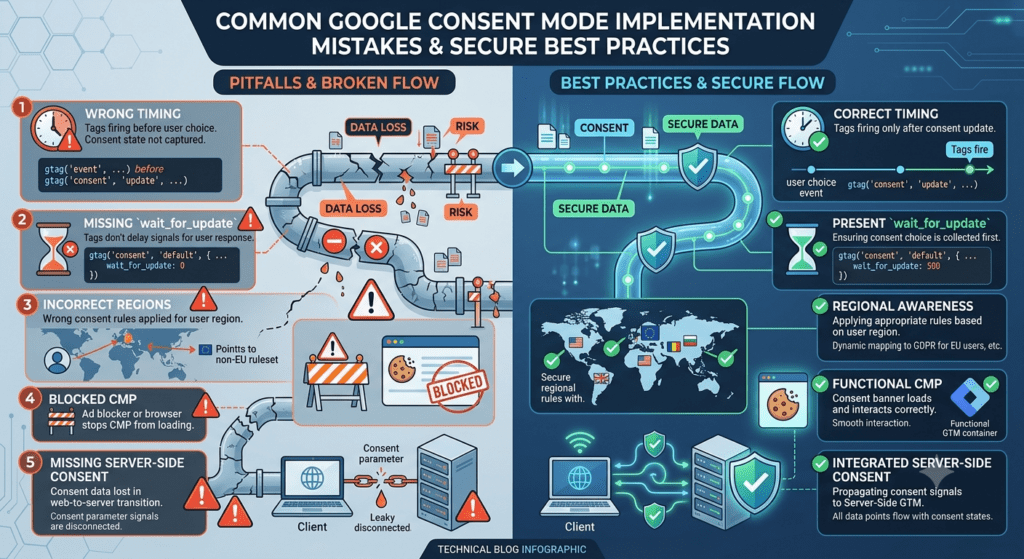
Failure Modes Worth Auditing For
| Mistake | Consequence |
| Default consent set after GA4/Ads tags fire | Data collected pre-consent, non-compliant |
| Missing wait_for_update | Tags fire once at default, never re-fire on grant |
| Wrong regional ISO codes | EEA users inherit non-EEA defaults |
| CMP tag itself gated by a consent check | Banner can’t load; nothing can grant consent |
| No update fired on rejection | No explicit denial recorded; weak audit trail |
| Consent state not passed to server container | Server-side tags ignore client-side consent decisions |
| Region list not reviewed after law changes | Outdated defaults persist silently |
| No periodic geo-testing | Regional bugs go undetected for months |
Each row in that table represents a failure that’s genuinely difficult to detect through normal QA, because the site still looks and behaves normally to anyone testing it manually. These are the kinds of bugs that surface only when someone cross-references analytics data against known traffic volumes, or when a legal review asks a question the tracking implementation can’t actually answer with confidence.
Conclusion
Consent Mode v2 isn’t really a tagging feature; it’s a sequencing discipline dressed up as a set of API calls. Every tag’s behavior needs to be a function of consent state, not a fixed configuration decided once at container build time and left untouched. The defaults protect the organization during the gap before a choice is made, the update mechanism recovers the data it’s entitled to once a choice is given, and the region layer lets both of those behave differently depending on jurisdiction, without requiring separate containers or duplicated logic for every market.
Done correctly, the user experience is invisible in the best sense. The banner shows up, the choice is respected, and the underlying plumbing just works without anyone downstream noticing the machinery behind it. Done incorrectly, it’s invisible in a worse sense: tags either quietly over-collect or quietly under-collect, and nobody notices until an audit, a legal inquiry, or an unexplained data gap forces the question to the surface, usually at a moment when it’s far more expensive to fix than it would have been to get right the first time.
Getting this right consistently, across markets, CMPs, and container versions that evolve over years rather than months, is less about any single snippet of code and more about disciplined process: clear ownership of the consent architecture, regular testing across regions, and a habit of treating consent state as a first-class variable in every tag decision rather than an afterthought bolted on at the end. That discipline is what separates a setup that is genuinely compliant and data-complete from one that only looks compliant until someone actually checks.
Make your website ready for the AI era.
AI is changing how people discover, evaluate, and interact with websites. We help you identify optimization opportunities across content, UX, technical performance, SEO, and conversion paths.