Key Takeaways
- GA4 cookies are scoped to a single registrable domain, so a user moving from marketing-site.com to shop.secure-payment.com is counted as a brand new visitor unless you configure cross-domain measurement.
- Cross-domain tracking works by decorating outbound links with a _gl URL parameter that carries the client ID and session state to the destination domain.
- Subdomains on the same root domain (www.example.com to shop.example.com) do not need cross-domain configuration. The _ga cookie is already written at the root domain level.
- Configure domains in GA4 Admin under Data Streams, then Configure tag settings, then Configure your domains. Both domains must fire the same measurement ID.
- Automatic link decoration only fires on anchor clicks and form submits. JavaScript redirects, window. open calls, and iframes need manual decoration.
- Adding a domain to the cross-domain list also removes it as a referral source, which is what stops the self-referral problem in your acquisition reports.
- For payment gateways you cannot tag (Stripe Checkout, PayPal), use the unwanted referrals setting instead of cross-domain measurement.
What is GA4 cross-domain tracking?
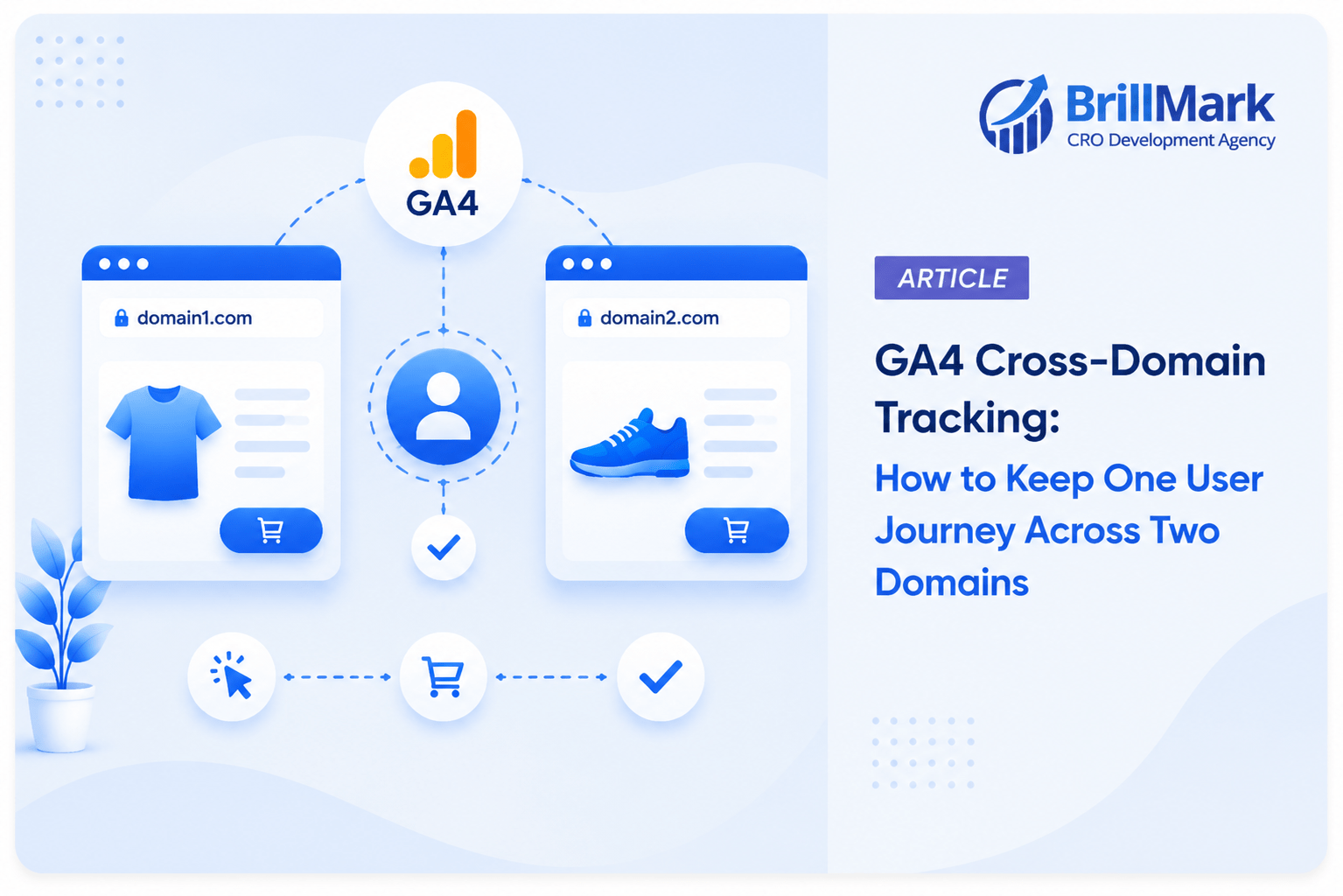
GA4 cross-domain tracking is the configuration that lets Google Analytics 4 treat visits to two or more separate domains as one continuous user session. It works by transferring the client ID and session ID from the source domain to the destination domain through a URL parameter, so both domains write the same identifier into their own first-party cookies.
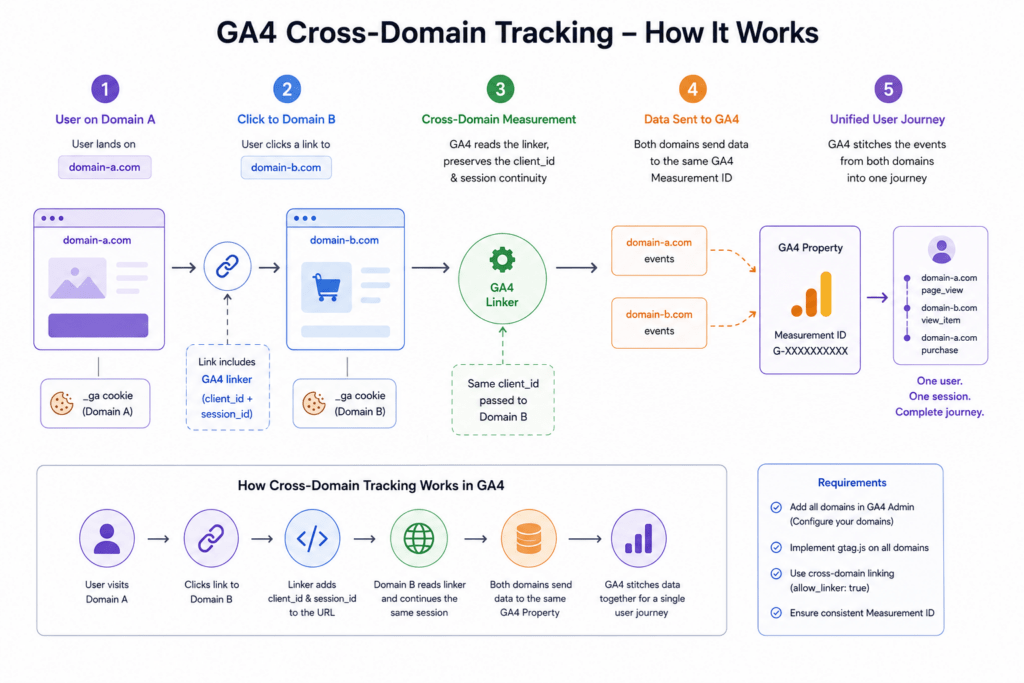
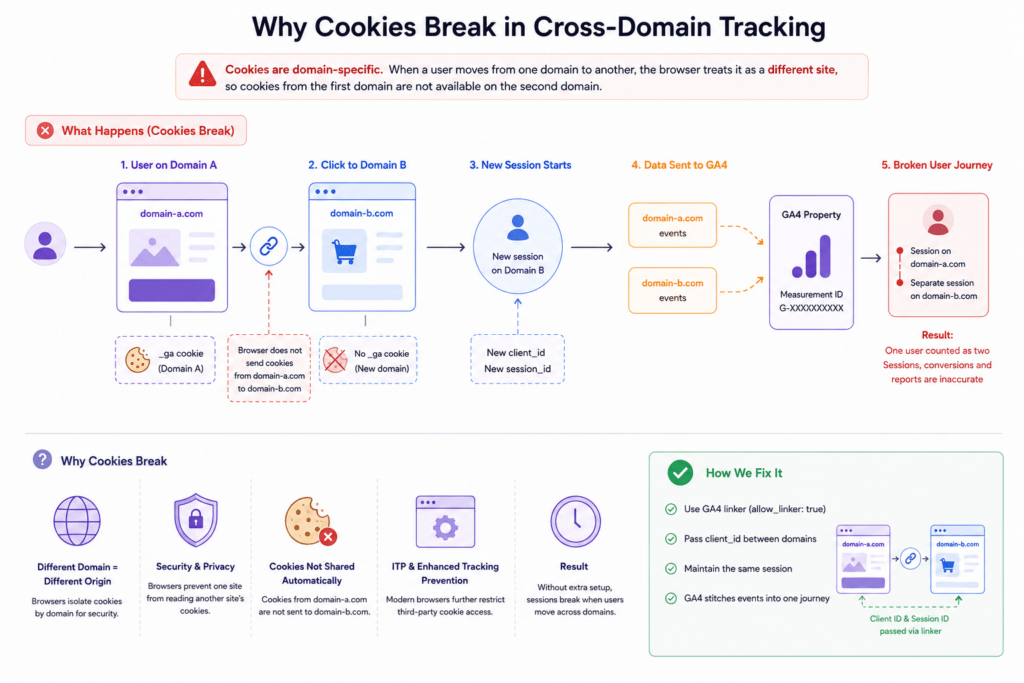
The technical constraint driving all of this is browser policy, not a GA4 limitation. Cookies are scoped to a registrable domain. A cookie written by marketing-site.com is unreadable by shop.secure-payment.com. Without a bridge, the second domain generates a fresh client ID.
That bridge is a URL parameter. GA4 appends _gl to outbound links; the destination page reads it, and the identity carries over.
Definition: The _gl linker parameter is a hashed URL parameter that carries the GA4 client ID and session values between domains during a link click.
Which cookies actually break, and why?
GA4 relies on two first-party cookies. Both are written by JavaScript on the domain the user is currently viewing, which is exactly why they do not survive a domain change. Neither cookie is shared, copied, or synced across registrable domains by any browser.
| Cookie | Purpose | Default expiry | Scope |
| _ga | Stores the client ID, the pseudonymous device identifier | 2 years (configurable) | Root domain and all subdomains |
| _ga_<MEASUREMENT_ID> | Stores session ID, session number, and engagement state | 2 years (configurable) | Root domain and all subdomains |
| _gid | Legacy Universal Analytics cookie, not used by GA4 | 24 hours | Root domain |
A _ga cookie value looks like GA1.1.1234567890.1678901234. The last two segments together form the client ID: 1234567890.1678901234.Note the scope column. Both cookies are written at the root domain by default, which is the reason subdomains work without any extra configuration.
Do subdomains need cross-domain tracking?
No. Subdomains sharing a registrable domain do not need cross-domain configuration. GA4 uses automatic cookie domain configuration, which writes the _ga cookie at the highest resolvable level, so www.example.com and shop.example.com both read the same cookie and the same client ID.
This is the single most common misconfiguration in GA4 setups. Teams add subdomains to the cross-domain list, then wonder why nothing changed. Nothing changed because nothing was broken.
You need cross-domain measurement only when the registrable domain differs:
| Journey | Cross-domain needed? | Reason |
| example.com to shop.example.com | No | Same root domain, shared _ga cookie |
| example.com to example.co.uk | Yes | Different registrable domains |
| marketing-site.com to shop.secure-payment.com | Yes | Different registrable domains |
| example.com to checkout.stripe.com | No, use unwanted referrals | You cannot install your tag on the gateway |
The one exception for subdomains: if a legacy cookie_domain setting has been hardcoded to a specific subdomain, the cookie is written narrowly and the subdomain journey breaks. Check your tag configuration for an explicit cookie_domain value before assuming subdomains are safe.
How does the _gl linker parameter work?
When a user clicks a link pointing to a configured domain, GA4 reads the current client ID and session values, hashes them into a single string, and appends it as _gl to the destination URL. The destination page, running the same measurement ID, detects the parameter, validates it, and writes those values into its own cookies instead of generating new ones.
A decorated URL looks like this:
Three implementation details matter here:
- The parameter has a short validity window. The _gl value carries a timestamp and expires roughly two minutes after generation. A user who copies a decorated link and opens it an hour later gets a new client ID. This is deliberate, since a permanently valid identifier in a shareable URL would be a privacy problem.
- The destination must run the same measurement ID. Cross-domain tracking is a property-level concept. Two domains reporting into two different GA4 properties cannot stitch a session, no matter how the links are decorated.
- The parameter is stripped from the address bar. GA4 removes _gl after reading it, so it does not pollute page URLs or landing page reports.
How do you configure cross-domain tracking in GA4?
Configuration happens in the GA4 interface, not in code, for standard link-based journeys. The setting lives at the data stream level and applies to every tag firing that measurement ID.
Steps:
- Open GA4 Admin, then Data streams, then select your web stream.
- Click Configure tag settings.
- Click Configure your domains.
- Add each domain in the journey, including the domain you are configuring from.
- Choose a match type: contains, begins with, ends with, exactly matches, or matches regex.
- Save, then verify that the same measurement ID is deployed on every listed domain.
For match types, contains is the default and is the riskiest option. A rule set to contain pay will decorate links to paypal.com, payments-partner.net, and any other unrelated domain with that substring, leaking client IDs to sites you do not control. Use exactly matches for known hostnames wherever possible.
If you deploy GA4 through Google Tag Manager, the same list can be set on the Google tag configuration under Configuration settings, using the linker_domains field. When both are present, the settings merge rather than override.
Why does adding a domain also fix self-referrals?
Because GA4 automatically treats every domain in your cross-domain list as an internal domain, and internal domains cannot start a new acquisition session. Before configuration, shop.secure-payment.com appears as a referral source in your reports, splitting one conversion path into two sessions and reassigning the credit away from the real source.
This is why the symptom most teams notice first is not “our funnel is broken.” It is “our own domain shows up as a top traffic source.” Self-referral is the reporting fingerprint of a missing cross-domain configuration.
The order of damage is predictable:
- Session 1: Google Ads to marketing-site.com, no conversion recorded.
- Session 2: marketing-site.com referral to shop.secure-payment.com, purchase recorded.
- Result: the paid campaign gets zero conversion credit, and your own marketing site gets attributed as a referrer.
When does automatic link decoration fail?
Automatic decoration only intercepts standard anchor clicks and form submissions. Any navigation that bypasses those two events also bypasses decoration, which is the most common reason a correctly configured setup still produces broken sessions.
| Navigation method | Decorated automatically? | Fix |
| <a href=”…”> click | Yes | None needed |
| Form submit with action attribute | Yes | None needed |
| window.location.href = “…” | No | Manual decoration before redirect |
| window.open(“…”) | No | Manual decoration before opening |
| Server-side 301 or 302 redirect | No | Pass the parameter through the redirect |
| iframe src attribute | No | Manual decoration or postMessage |
| Link inside an iframe pointing to the parent’s target | No | Bridge from the parent frame |
Manual decoration with gtag:
gtag('get', 'G-ABC123XYZ', 'client_id', (clientId) => {

  gtag('get', 'G-ABC123XYZ', 'session_id', (sessionId) => {

    const url = new URL('https://shop.secure-payment.com/cart');

    url.searchParams.set('client_id', clientId);

    url.searchParams.set('session_id', sessionId);

    window.location.href = url.toString();

  });

});

On the destination, read those parameters and pass them into the config call:

const params = new URLSearchParams(window.location.search);

gtag('config', 'G-ABC123XYZ', {

  client_id: params.get('client_id'),

  session_id: params.get('session_id')

});
This approach passes raw values rather than the hashed _gl string, so it has no two-minute expiry, but it also exposes the client ID in plain text. Restrict it to first-party destinations you control and strip the parameters from the URL after reading them.
How does this compare to iframe communication?
The underlying problem is identical: two isolated execution contexts that cannot read each other’s storage, requiring an explicit message to carry identity across the boundary. Cross-domain tracking uses the URL as the message channel. Iframe communication uses postMessage. Both are bridging patterns built on the same same-origin constraint.
The parallel holds practically as well. In both cases:
- The sending context must resolve the identifier before the boundary is crossed, since it cannot be requested afterward.
- The receiving context must validate the payload rather than trusting it blindly.
- Timing matters. A message sent before the receiver is listening is lost, exactly as a _gl parameter read after expiry is discarded.
For an embedded checkout inside an iframe, the practical fix is to decorate the iframe src at the moment you write it, using the same gtag(‘get’, …) pattern shown above. Setting src in static HTML gives GA4 nothing to intercept.
How do you validate that cross-domain tracking works?
Validation requires checking three things in order: the parameter appears, the client ID matches, and no new session starts. Checking only one of the three produces false confidence, since a decorated link can still fail if the destination tag is misconfigured.
Step-by-step validation:
- Check decoration. Click the cross-domain link and inspect the destination URL before the page finishes loading. You should see _gl= in the address bar. If it never appears, decoration failed at the source.
- Compare client IDs. In the browser console on each domain, run document.cookie.split(‘; ‘).find(c => c.startsWith(‘_ga=’)). The last two segments must be identical on both domains.
- Check session continuity. Open GA4 DebugView and follow the journey. A session_start event firing on the second domain means the bridge failed even if the client ID matched.
- Check referral reports. After 24 to 48 hours, confirm your own domains no longer appear under Traffic acquisition as session sources.
DebugView is the fastest of the four because it shows the failure and its shape at the same time. A matching client ID with a fresh session_start points at session ID transfer, not client ID transfer, which usually means a manual decoration is passing client_id without session_id.
What about payment gateways you cannot tag?
Use the unwanted referrals setting, not cross-domain measurement. Cross-domain tracking requires your tag on both domains, which is impossible on hosted checkout pages like Stripe Checkout or PayPal. The unwanted referrals list instead tells GA4 to ignore those domains as referral sources when the user returns.
Configure it under Admin, then Data streams, then Configure tag settings, then List unwanted referrals. Add the gateway hostnames.
Without this, the return trip from the gateway to your confirmation page starts a fresh session attributed to the payment provider, and every purchase in your reports gets credited to paypal.com rather than the campaign that earned it.
Note the difference clearly:
| Setting | Use when | Effect |
| Configure your domains | You control both domains and can deploy your tag on each | Passes client ID and session ID, prevents self-referrals |
| List unwanted referrals | A third party hosts a step and you cannot deploy your tag | Prevents referral attribution only, does not preserve session identity |
How do browser privacy controls affect this?
Safari’s Intelligent Tracking Prevention caps JavaScript-written cookies at seven days, and applies a shorter cap when a navigation arrives with link decoration from a domain it has classified as a tracker. Since GA4 writes _ga via JavaScript and cross-domain journeys are link-decorated by definition, cross-domain setups face the tightest version of this constraint.
The practical consequences:
- Returning-user recognition degrades faster on Safari than on Chrome, inflating new user counts.
- Long consideration cycles that span more than a week may be split into separate users.
- Consent Mode denial means no client ID exists to pass, so decoration produces nothing regardless of configuration.
Server-side tagging mitigates the cookie lifetime issue by setting _ga as an HTTP cookie from your own domain rather than through JavaScript, which places it outside the JavaScript cookie cap. It does not solve consent denial, and it adds infrastructure cost and complexity that only makes sense at meaningful traffic volume.
Frequently asked questions
Does cross-domain tracking work between two different GA4 properties?
No. Both domains must send data to the same measurement ID. Cross-domain measurement stitches sessions within one property. Two properties will always produce two separate users and two separate sessions, regardless of link decoration.
Will the _gl parameter appear in my landing page reports?
No. GA4 strips _gl from the URL after reading it, and the parameter is excluded from page path dimensions. If you see it persisting in reports, the destination tag is not processing it, which is itself a sign that the configuration is incomplete.
Do I need to add both domains to the list, or only the destination?
Add every domain in the journey to the list on every data stream. The list functions as a set of internal domains, and each domain needs to recognize the others both to decorate outbound links and to accept incoming parameters.
How long is a decorated link valid?
Roughly two minutes from generation. This applies to shared or bookmarked links, not to a normal click, since a click navigates within milliseconds. A user who copies a URL containing _gl and opens it later will be counted as a new user on that domain.
Does cross-domain tracking work with Google Tag Manager?
Yes. Set the domain list either in the GA4 interface or in the Google tag configuration’s linker_domains field inside GTM. Both approaches produce the same result, and when both are configured, the lists merge. GTM does not decorate iframe sources or JavaScript redirects automatically.
Why is my client ID matching but sessions still splitting?
The session ID is not transferring. This happens most often with manual decoration that passes client_id alone. GA4 needs both client_id and session_id to continue a session rather than start a new one under the same user.
Make your website ready for the AI era.
AI is changing how people discover, evaluate, and interact with websites. We help you identify optimization opportunities across content, UX, technical performance, SEO, and conversion paths.