Most eCommerce A/B Testing guides for Shopify tell you what to test. This one focuses on what most guides skip: how to run experiments without breaking tracking, corrupting data, or making decisions based on results you cannot trust.
What is Shopify A/B testing?
Shopify A/B testing and why it drives ecommerce growth
Shopify A/B testing is the process of running controlled experiments on your store to identify which version of a page, element, or message converts more visitors into buyers. Instead of guessing what will work, you test against real traffic and let data decide.
- Every Shopify store has conversion gaps: product pages that attract visitors but lose buyers, CTAs that get ignored, checkout flows that create friction
- A/B testing closes those gaps systematically, replacing instinct with evidence
- Stores with structured experimentation programs consistently outperform those relying on redesigns or assumptions alone
Which tests deliver results?
Shopify A/B tests that consistently work
The highest-impact tests target elements users interact with most before deciding to buy.
- Product page headlines and descriptions: benefit-led copy consistently outperforms feature-focused text
- CTA button copy and placement: “Add to cart” vs. “Buy now” vs. “Get yours today” can each perform differently by audience and product type
- Product imagery: lifestyle vs. product-only shots, video vs. static, single image vs. gallery carousels
- Pricing presentation: showing original price with a discount, free shipping thresholds, or subscription framing
- Shipping and trust messaging: estimated delivery dates, free returns badges, and security seals placed near the CTA
Where to focus first?
Which Shopify pages to prioritize
Not every page deserves equal testing attention. Prioritize pages where traffic volume is high and conversion impact is direct.
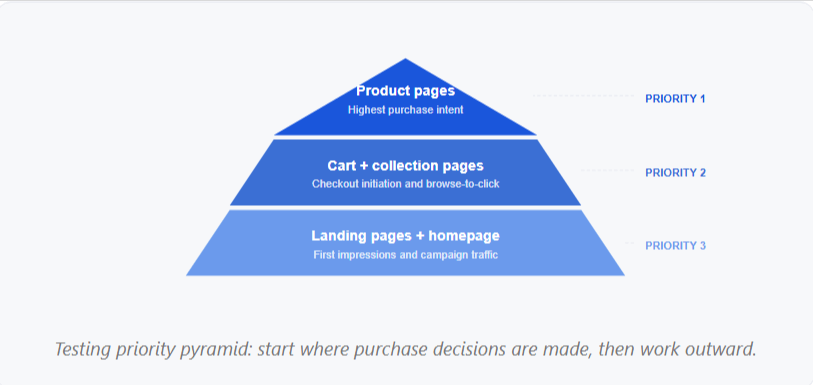
- Product pages: the highest-leverage surface on most Shopify stores, where purchase decisions are made
- Collection pages: sorting, filtering, grid layout, and product card design all affect click-through rates
- Cart page: shipping thresholds, upsell placement, and CTA prominence directly affect checkout initiation
- Landing pages: high-traffic campaign pages often have weak conversion rates and strong test potential
- Homepage: lower direct conversion impact, but useful for testing first impressions and navigation clarity.
What breaks during Shopify experiments?
What commonly breaks during Shopify A/B tests
This is what most Shopify testing guides skip. Implementation problems are the most common reason experiment data cannot be trusted.
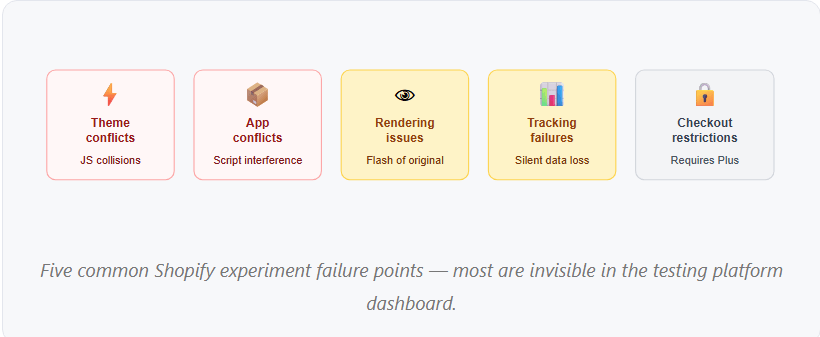
- Theme conflicts: Shopify themes use custom JavaScript that collides with experiment scripts, causing variants to render incorrectly or not at all
- App conflicts: review apps, upsell tools, loyalty widgets, and live chat all inject scripts that can overwrite variant changes after the experiment fires
- Broken or delayed rendering: variants load after the original element, creating a visible flash of original content before the test variant appears
- Tracking failures: conversion events fire on the wrong trigger, stop firing, or fire multiple times per session
- Checkout restrictions: Shopify limits what can be modified in checkout without Shopify Plus, constraining what can be tested directly
How do theme and app conflicts affect results?
How theme and app conflicts corrupt experiment results
Theme and app conflicts are the leading cause of corrupted Shopify experiment data, and they are often invisible in the experiment platform dashboard.
- Dynamic content loaded by apps (recently viewed products, personalization tools) can overwrite variant changes after the experiment script fires
- JavaScript collisions between the testing tool and third-party apps cause variant elements to render partially or not at all
- Layout shifts triggered by late-loading scripts affect both user experience and Core Web Vitals scores
- Conflicts are often browser-specific or device-specific, making them easy to miss during basic QA
Why is this dangerous
A conflict can cause the variant to appear broken to only 15% of mobile users on Safari, enough to significantly skew conversion rate data without flagging any obvious errors in the dashboard.
How does tracking corrupt test data?
How tracking and analytics issues corrupt Shopify test data
A Shopify experiment can look healthy in the testing platform while silently producing corrupted data in GA4. Tracking problems are the most dangerous type of failure because they are the least visible.
- Missing conversions: purchase events that fail to fire mean experiment results undercount actual sales, making winning variants appear neutral
- Duplicate events: the Shopify order confirmation page can be reloaded, causing the purchase event to fire multiple times per order and inflating revenue figures
- Incorrect attribution: when variant data is not passed as a GA4 custom dimension, revenue cannot be accurately attributed to control vs. variant
- Revenue discrepancies: mismatched transaction IDs or missing product parameters create gaps between Shopify revenue and GA4 revenue
How do you QA a Shopify experiment?
How to QA a Shopify experiment before launch
QA is not optional for Shopify experiments; it is the process that determines whether results can be trusted.
Visual QA
- Variant renders on desktop and mobile
- No layout shifts or broken images
- CTAs visible and correctly labeled
- Tested in Chrome, Firefox, Safari, Edge
Functional QA
- Add-to-cart works in all variants
- Product selectors and filters work
- Checkout completes end-to-end
- Page speed is not degraded by the variant
Tracking QA
- DebugView confirms each event fires once
- GTM Preview verifies tag parameters
- Purchase event fires once per order
- Revenue value matches the actual order
How to validate revenue tracking?
How to validate revenue and e-commerce tracking
Revenue tracking errors are the most expensive QA failure in Shopify experiments. A purchase event that fires twice or captures incorrect order values can make a neutral variant appear to drive significant revenue.
Complete a test transaction and verify the purchase event fires exactly once
- Confirm the transaction ID is unique per order and passes correctly to GA4
- Verify the revenue value matches the actual order total
- Confirm product IDs, names, quantities, and prices match the actual cart contents
- Reload the confirmation page and verify the purchase event does not fire again
- Check that revenue is attributed to the correct experiment variant via a custom dimension
How do you know if results are trustworthy?
How to identify whether a Shopify test result is trustworthy
A result that looks conclusive in your testing platform can still be unreliable if the underlying data quality is poor. Before acting on any experimental result, validate these four factors.
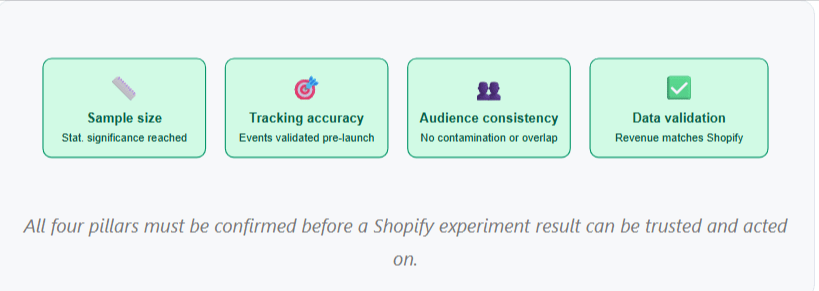
- Sample size: the experiment ran long enough to reach statistical significance, not just until results looked favorable
- Tracking accuracy: events were validated in DebugView before launch, and no anomalies appeared during the experiment
- Audience consistency: no overlap with other experiments, and variant assignment remained stable throughout the test
- Data validation: GA4 revenue closely matches Shopify revenue for the same period, confirming no duplication or attribution errors
What mistakes should you avoid?
Most common Shopify A/B testing mistakes
Most Shopify experiments that produce unreliable results share the same avoidable mistakes.
- Testing too many changes at once makes it impossible to identify which change drove the result
- Launching without tracking validation: discovering data gaps after weeks of data collection means starting over
- Ending tests too early: acting on early results before reaching statistical significance produces unreliable conclusions
- Ignoring mobile during QA: despite mobile accounting for the majority of Shopify traffic, most teams test primarily on desktop
- Looking only at conversion rate, revenue per visitor can reveal a different winner than conversion rate alone
How do you build a reliable program?
How to build a reliable Shopify experimentation program
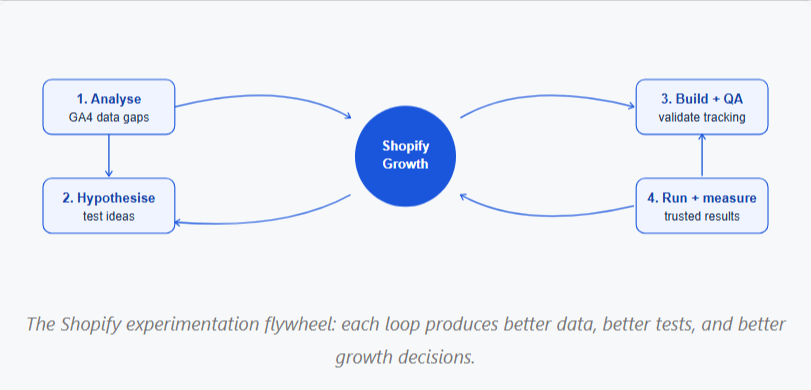
Reliable Shopify experimentation is not about running more tests; it is about running better ones. The teams with the strongest results combine structured test planning, technical implementation, QA discipline, and analytics validation into a repeatable process.
- Start with a prioritized test backlog based on GA4 data, not assumptions
- Validate every experiment before launch using a consistent QA checklist
- Track results at the revenue level, not just the conversion rate level
- Document what worked, what failed, and why, so institutional knowledge compounds over time
- Treat QA and analytics validation as non-negotiable steps in every development cycle
Ready to turn your Shopify experiments into measurable growth?
CONCLUSION
Launching a Shopify A/B test is only the beginning. The real value comes from collecting accurate data, identifying meaningful conversion opportunities, and turning experiment results into revenue-driving decisions.
Brillmark helps businesses move beyond basic testing with Shopify experimentation, conversion optimization, A/B testing development, analytics validation, and full-service experimentation programs. Our team has supported 200+ agencies and global brands in using data to make better decisions and drive measurable growth.
Whether you need help implementing Shopify tests, validating analytics, identifying high-impact opportunities, or building a structured experimentation program, Brillmark can help.
Make your website ready for the AI era.
AI is changing how people discover, evaluate, and interact with websites. We help you identify optimization opportunities across content, UX, technical performance, SEO, and conversion paths.