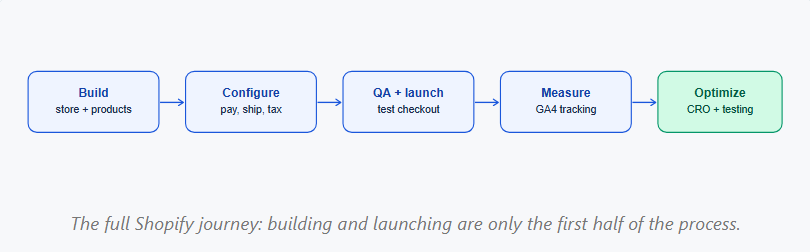
Most Shopify tutorials stop at launch. This one covers the full path: building your store, launching it correctly, and optimizing it for growth once it’s live.
What is Shopify?
Shopify is an all-in-one ecommerce platform for building, managing, and scaling an online store without code. It handles hosting, security, and payments so you can focus on products and customers.
- New entrepreneurs launching a first product or brand
- Retailers moving from in-person sales to online
- Dropshippers needing fast, low-cost setup
- Growing brands needing flexibility to add apps and features
How do you start?
Creating a store starts with a free trial and a plan that matches your business stage.
- Sign up at shopify.com and enter your store name
- Choose a plan based on sales volume and feature needs
- Set default language, currency, and time zone before adding content
- Add business address and store details under Settings
How do you customize and add products?
Customization happens through the theme editor. Products are added through the Products section of the admin.
- Choose a theme matching your brand and upload your logo and colors
- Build navigation so customers find collections and key pages easily
- Create essential pages: About, Contact, FAQ, Shipping, Returns
- Add product titles, descriptions, pricing, and high-quality images
- Set inventory tracking and group products into collections
How to configure payments, shipping, and taxes
These three settings must be correct before your store can legally and functionally process orders.
- Activate Shopify Payments or connect a third-party gateway
- Set shipping zones, rates, and delivery times
- Configure tax settings for your location and shipping destinations
- Test that all payment methods display correctly at checkout
Essential Shopify apps for beginners
The App Store has thousands of options, but beginners only need a few categories to start strong.
- SEO: manage meta titles, descriptions, and alt text
- Reviews: social proof that builds trust with new visitors
- Email marketing: capture and nurture leads from day one
- Analytics: deeper reporting beyond the native dashboard
- Customer support: live chat for pre-sale questions
Installing too many apps slows your site down. Start with one app per category.
Pre-launch checklist for your Shopify store
A pre-launch checklist catches the errors that cost beginners sales in the first week.
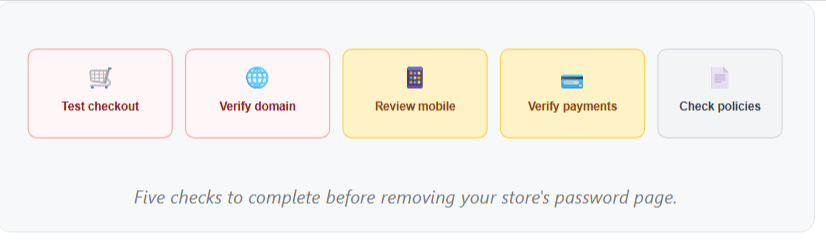
- Test the full checkout flow with a real test transaction
- Connect and verify your custom domain
- Review the entire store on mobile, not just desktop
- Confirm all payment methods process correctly
- Check shipping, refund, and privacy policies are accurate
How do you optimize for conversions?
Launching is the starting line. Conversion optimization turns visitors into paying customers.
- Use clear, action-oriented CTAs on product and collection pages
- Invest in high-quality product images and lifestyle photography
- Add trust signals: reviews, security badges, clear return policies
- Improve site speed, since slow pages directly reduce conversions
- Confirm mobile usability on your highest-traffic pages
When should analytics be set up?
Analytics should be configured before launch, not after you start spending on ads.
- Install GA4 and connect it to your Shopify store
- Set up ecommerce tracking for add-to-cart, checkout, and purchase
- Mark key conversion events so they appear in GA4 reports
- Verify tracking fires correctly using GA4 DebugView before launch
Common beginner mistakes on Shopify
Most early-stage failures come from a handful of repeatable mistakes. Launching without analytics or conversion tracking configured
- Ignoring mobile users despite mobile driving most ecommerce traffic
- Installing too many apps, slowing load times
- Skipping basic SEO setup, including meta titles and alt text
- Not testing checkout end to end before going live
What to do after your Shopify store goes live
Launch is the beginning of store management, not the finish line.
- Monitor analytics weekly to track traffic and conversion trends
- Continue improving SEO with fresh content and metadata
- Run A/B tests on product pages, CTAs, and pricing
- Optimize underperforming pages using real visitor data
Ready to turn your Shopify store into measurable growth?
Launching your Shopify store is only the beginning. The real value comes from optimizing your storefront, understanding customer behavior, and making data-driven improvements that increase conversions and revenue.
Brillmark helps businesses move beyond basic store setup with Shopify development, analytics implementation, conversion optimization, A/B testing development, and full-service experimentation programs. Our team has supported 200+ agencies and global brands in using data to make better decisions and drive measurable growth.
Whether you need help improving your Shopify store, implementing analytics, identifying high-impact optimization opportunities, or building a structured experimentation program.
Make your website ready for the AI era.
AI is changing how people discover, evaluate, and interact with websites. We help you identify optimization opportunities across content, UX, technical performance, SEO, and conversion paths.